 Carta
Carta
See the screens
Open any form, report, or menu straight from the binaries — and follow how the screens reach each other. No VFP.
Point Carta at a VFP 9 project and in minutes you have the screens, the data model, the call graph, and the answer to "what breaks if I change this?" — whether you're maintaining the app or scoping a move off FoxPro. It reads the binary .scx / .vcx / .frx / .mnx / .dbc files ordinary tools can't open, with no VFP runtime needed, and it never edits your code. Get your bearings in hours, not the weeks it takes by hand.
runs on your machine or your own server · offline license keys · no cloud, no telemetry
Built by Pivoten — a team that keeps 30-year Visual FoxPro systems running in production. This is the tooling we built for our own work.
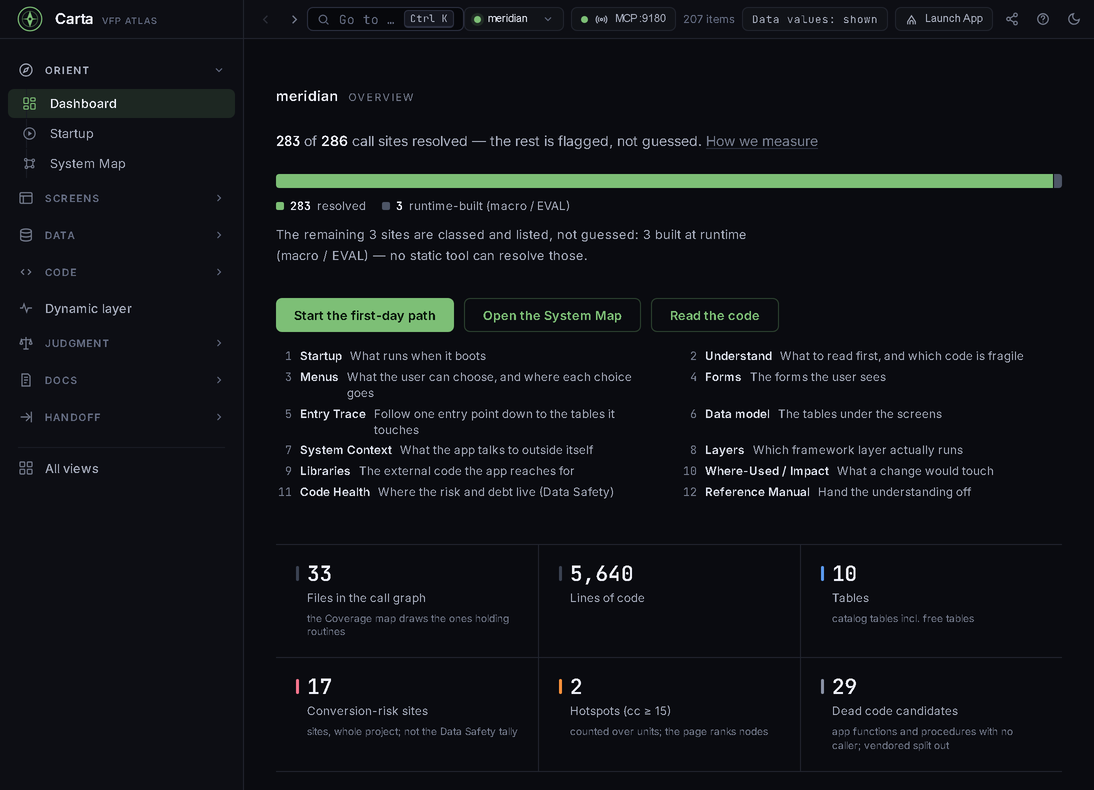
On the Meridian demo, 283 of 288 call sites resolve to a definite target without running anything. Of the other 5, Carta proves 2 are harmless sort-column macros whose values cannot call anything, and 3 are a macro or an EVAL whose text is built at run time — a field-name macro, an SQL statement and an EVAL that builds a method call — so no reading of the code can prove they call nothing. Carta doesn't guess at those: it lists every one, with where the macro sits. The Dynamic layer then narrows what is left.
Open any form, report, or menu straight from the binaries — and follow how the screens reach each other. No VFP.
Every table, the declared relations and the ones only the code knows about, and who reads and writes each table.
Complexity hotspots, data-safety hazards, dead code and conversion-risk sites — whether you're changing the app or moving off it.
Search everything (binaries included), trace calls hop by hop, and answer "what breaks?"
Product tour
A quick tour on the fictional Meridian Trading Co. demo project — captured straight from the cockpit, nothing staged. Five moments from one app: follow the data, size a change before you make it, search inside the binaries, see what VFP decides at run time, then read the whole codebase's state in one report.
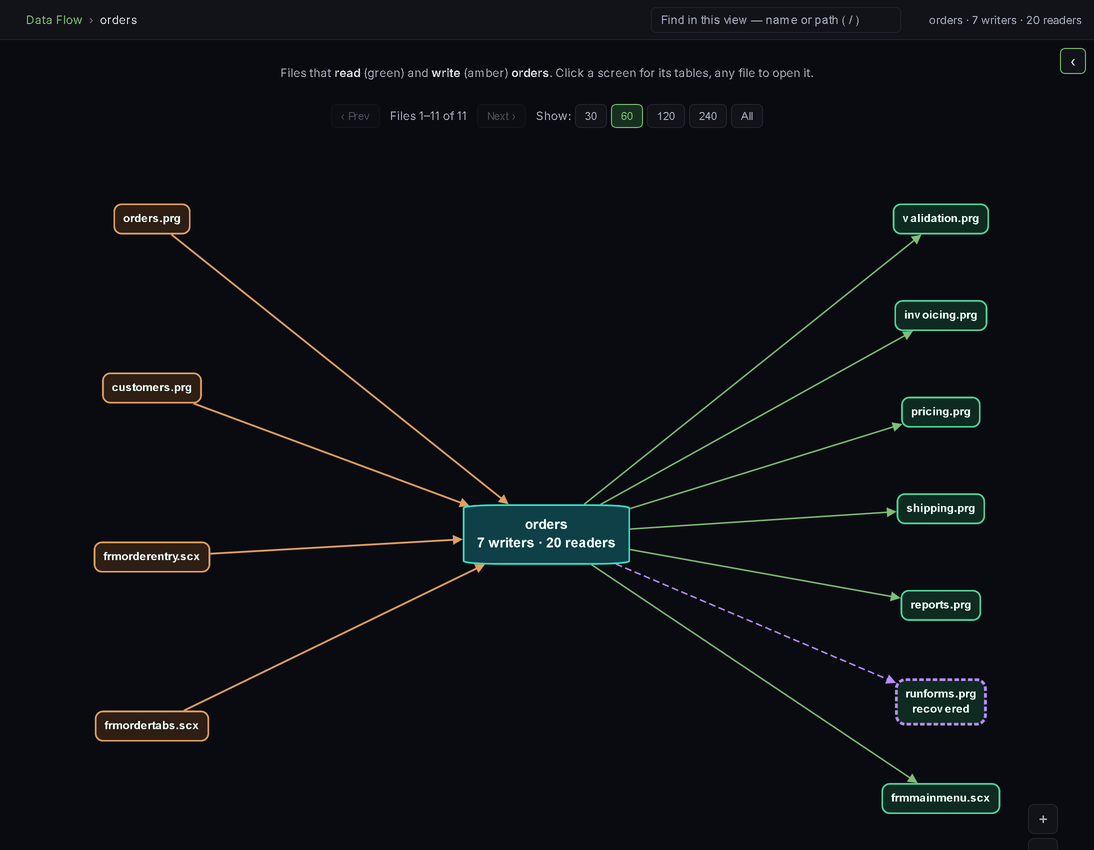
Pick a table and Carta draws who writes it (amber) and who reads it (green),
screens and code alike. Here orders: 7 writers, 20 readers. A link it
couldn't read literally — recovered from a macro or dynamic SQL — is drawn dashed and
labeled, never quietly dropped or guessed.
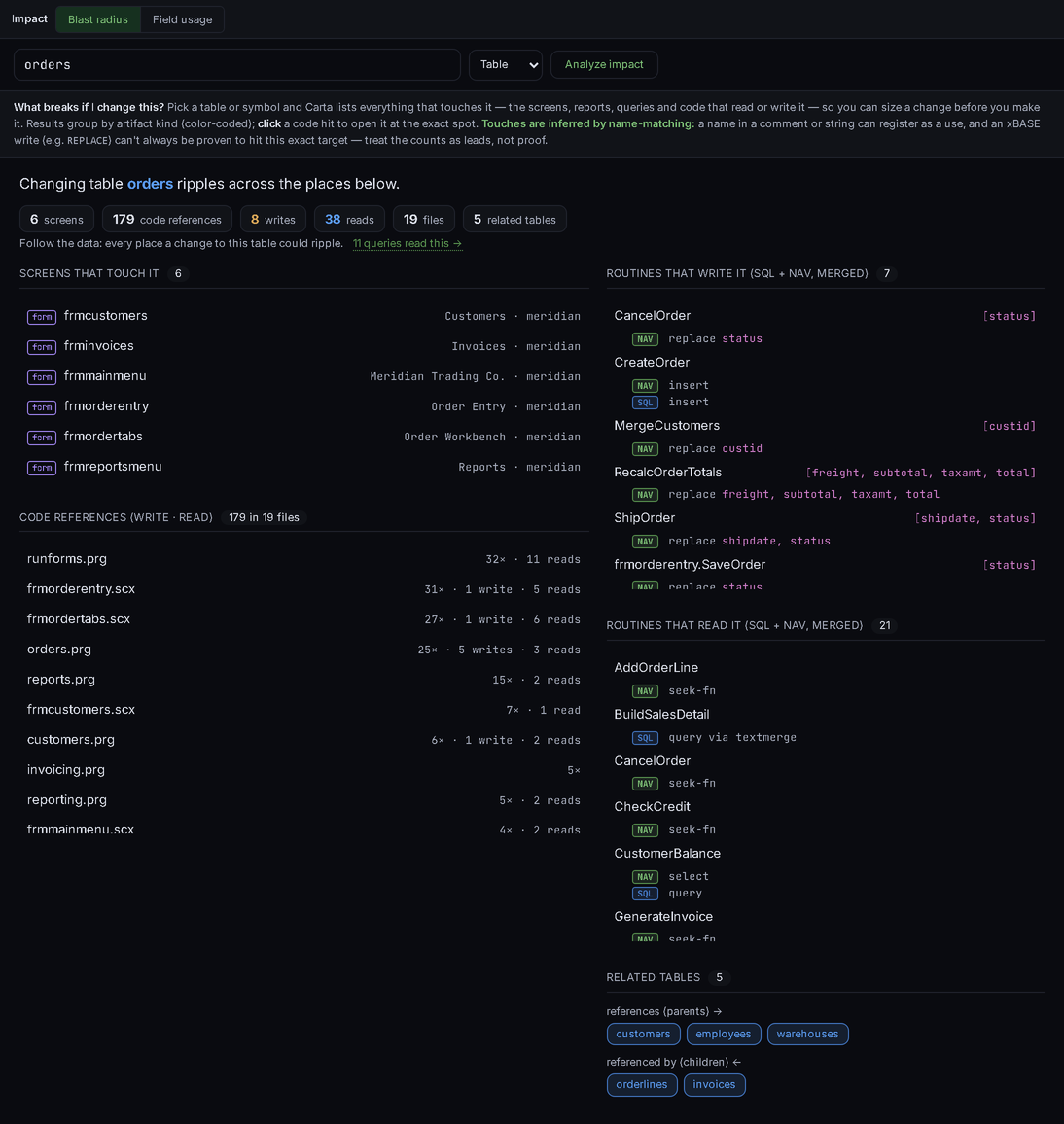
Impact on orders: 6 screens, 179 code references
(8 writes / 38 reads) across 19 files, and 5 related tables — with the
routines that write and read it listed out, each tagged by the columns it touches. And it
tells you how far to trust the counts: they're leads, not proof.
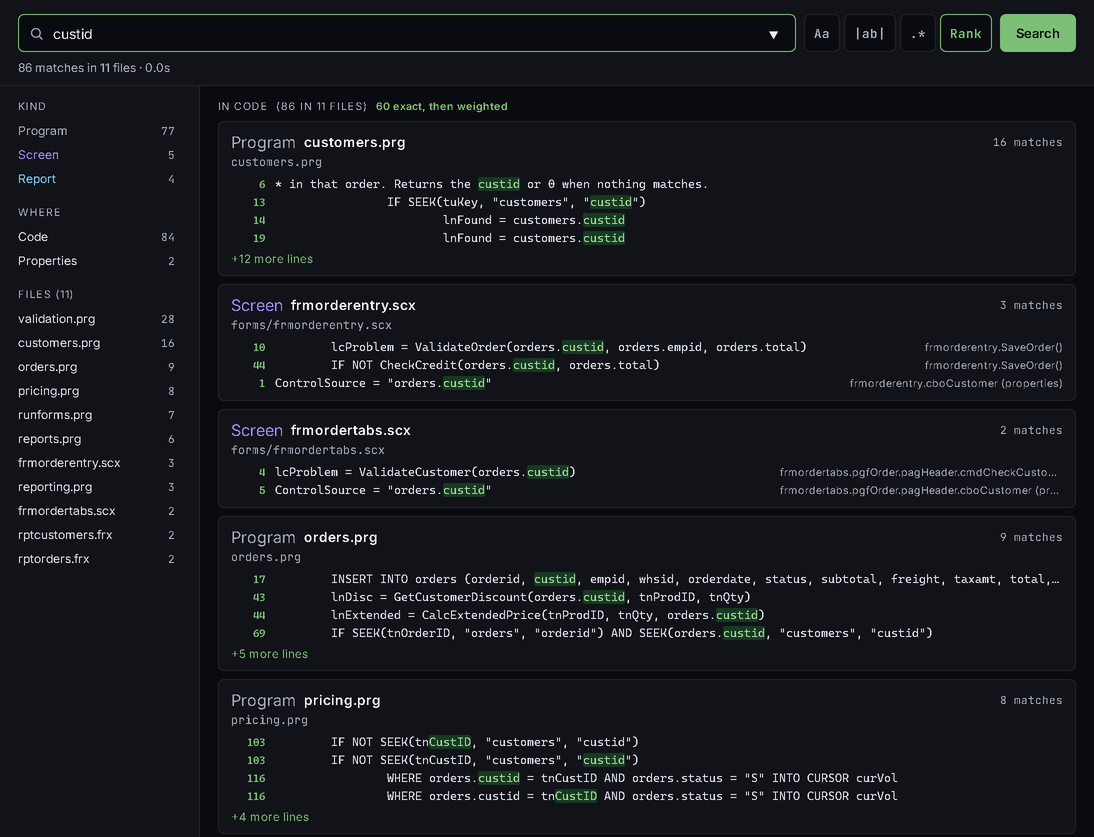
.prg.Text or regex across every file at once, and the part grep can't do — inside the
binary .scx / .vcx / .frx / .mnx. Here
custid returns 86 matches in 11 files, including a form's method code and a
control's ControlSource, with exact matches ranked first.
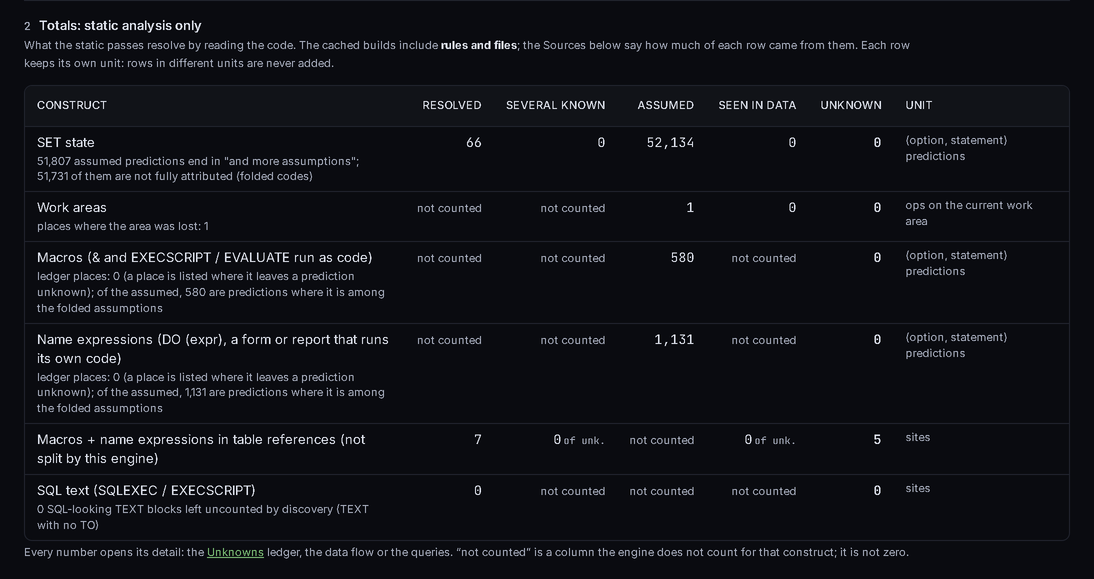
SET state, work areas, macros, name expressions, table names built in code: the Dynamic layer shows what the static read already resolves, construct by construct, and what would narrow the rest — your project rules, values from your own tables, the files the app reads at start-up, a coverage log. Every row keeps its own unit, and "not counted" is never shown as zero.
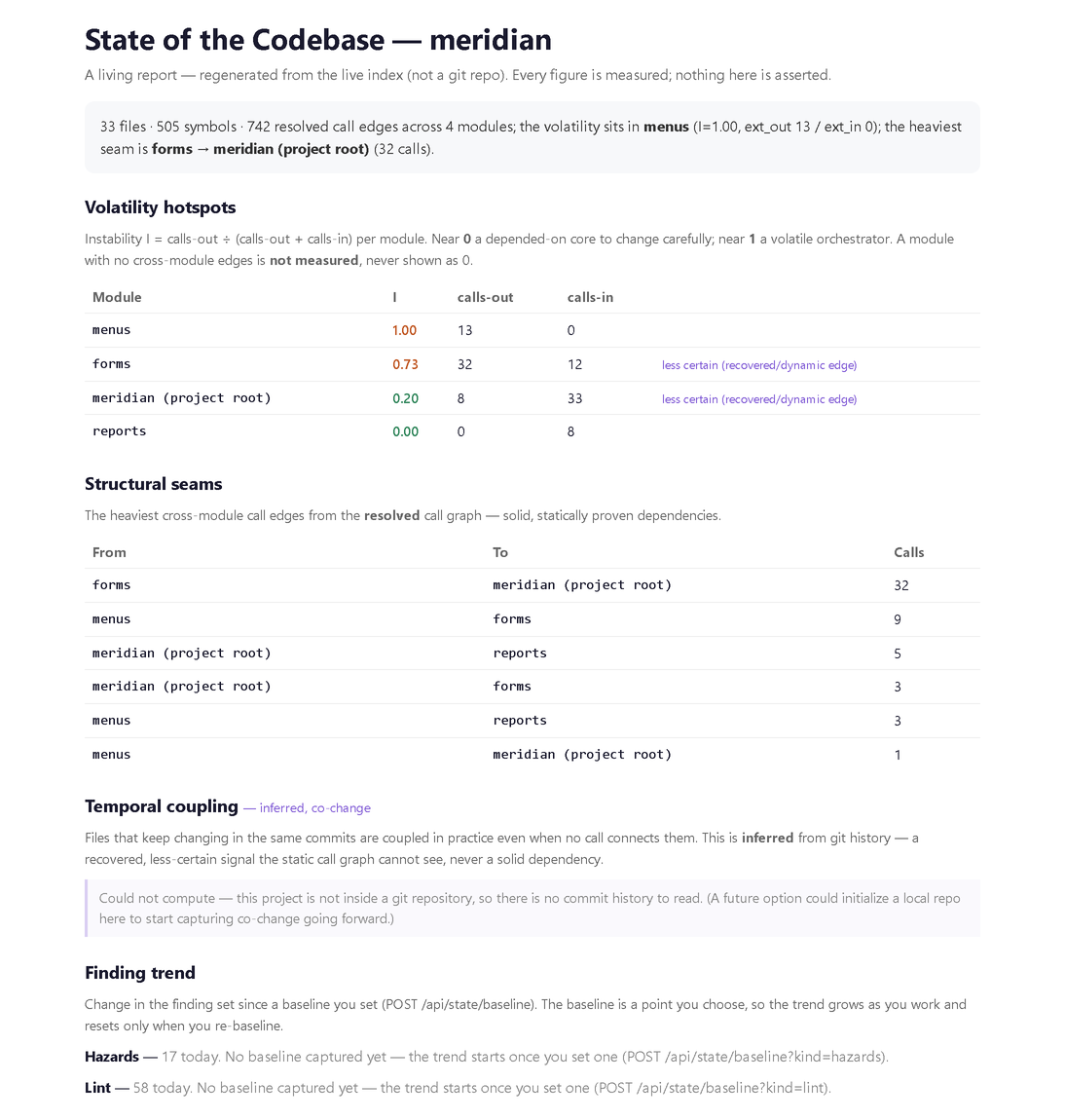
Carta composes what it measured — volatility hotspots, the structural seams, temporal coupling from git history, and the finding trend since a baseline you set — into one living report you can hand to anyone. It tells "could not compute" apart from a real zero: this copy of the demo isn't under git, and the report says so instead of printing a zero.
That's the guided tour. Here's the rest of the surface, in a line each. The demo walks the ones you care about.
.dbc, the referential-integrity rules it declares, and the relations only the code knows about, marked as code-only..dbf, key columns linked; build a query by following the relations and run it over your own data.file:line — including reports that saved a printer environment.file:line and an evidence link..vcx.Why Carta
VFP has had no modern tooling since 2007 — and half of every FoxPro app is locked inside binary DBF artifacts. Carta was built for exactly that.
"What breaks if I change this?" Table → screens, classified read/write references, related tables. Symbol → the callers that reach it. The question every legacy dev asks daily, answered in one query.
Everything Carta knows comes from the project's files alone — the whole
analysis needs no running VFP. It works on any machine, and on projects VFP itself
can't currently open (a locked .pjx included). When you want to edit
or run something, Open in VFP hands it to your own licensed VFP — only when you ask.
.scx / .vcx / .frx / .mnx / .dbc are DBF containers; Carta parses them directly.
That means form previews without opening VFP and method-level search inside
binary forms — not just your .prg files.
Carta never edits your source: no .prg, form, class, report or menu is
written. What it keeps — notes, reports, settings — lives in a .carta folder
and in its own cache. No cloud, no telemetry, and your source never leaves the
building.
Dynamic VFP, head-on.
Macros (&lcField), DO (lcProg), data-driven menus — where static
tools give up. Carta resolves the dynamic calls it can prove (drawn dashed, "via
macro") and flags the rest honestly, so you see the moving parts instead of a blank.
Dynamic layer
A FoxPro app decides a lot at run time: which SET options are on, which
work area is selected, what a macro expands to, which table a name expression opens. The
Dynamic layer works through that with no VFP and no AI — and labels every value with
where it came from, so an assumption never passes for a fact.
First, what reading the code alone resolves — SET state, work areas, macros, name expressions, table references, SQL text — each in its own unit, never added together. What is left is listed by cause, with the fix for each.
Tell Carta what your framework does in a small rules file — a helper that selects a work area or opens a table, a timer method the runtime calls. Carta drafts suggested rules for the places it couldn't decide; you check and add them. A rule makes a value "assumed", never "proven".
When the answer lives in a table — a setting row, a table name in a config table — Carta reads only the fields the code uses that way. A secret guard masks anything that looks like a password, key or token, values stay on your machine, and AI clients get counts, not values, unless you opt in.
Point Carta at a copy of the deployed app's folder and it reads the INI keys,
FILE() tests, HOME() and GETENV() values the app takes
at start-up — it never touches the deployed machine. Have a SET COVERAGE log?
Add it to confirm targets. VFP stays optional.
By the numbers
Every figure below was read from the product on the Meridian demo project, never customer code — most of them are on screen in the tour above.
to map Meridian from a cold start, in under 5 seconds on an ordinary machine: 207 items, 10 tables, 11 binary forms, 5,640 lines of code.
call sites resolved without running anything. Of the other 5, Carta proves 2 are harmless sort-column macros, and 3 are macro or EVAL text built at run time — each of the 3 is listed.
for custid in 11 files — including matches inside binary .scx forms and .frx reports.
impact on orders: 6 screens, 8 writes / 38 reads across
19 files, 5 related tables — one query.
run-time values — record sources, data references, properties — resolved statically; the rest show their design value.
conversion-risk sites across the whole project, each at a file:line — the FoxPro landmines, located.
Independently verified
Carta reads the binaries directly — so we cross‑check that read against FoxBin2Prg, the FoxPro community's own converter, running in real Visual FoxPro. On the structural facts we diff — class and form parents, members, control classes, field expressions, menu items, database schema — the two agree on every comparable item, on public projects and real apps.
every VFP binary cross‑checked: classes, forms, reports, menus, databases
(.vcx .scx .frx .mnx .dbc).
reads & decodes a whole app's binaries in seconds — no VFP install, so it runs on a server or on a locked project.
reproducible on code you can download — the check runs on open‑source FoxPro projects, not just ours.
Your AI, your team
Connect an AI assistant to Carta's MCP server and it answers from the real project, with the evidence. Export the whole map as documentation. Run Carta on a server so the team opens it in a browser. Your source and data stay on machines you control.
Claude, or any MCP-capable agent, can ask where a symbol lives, what touches a table, how a screen works — answered from Carta's index, read-only by default. Actions such as driving the VFP IDE or a running VFP app are off until you switch them on.
Give each person or agent its own named key, scoped to what it may see — everything, a read-only view with no source text, or notes and reports only. Every MCP call lands in an audit log you can tail and verify.
Export the map as a Docusaurus project, an Obsidian vault or a self-contained HTML site with search. Notes your AI wrote about the app come along, labelled as AI-written and flagged when the code has moved on.
Run Carta's server on Windows x64, Windows ARM64 or Linux x64 — one process per project — and the team opens the cockpit in a browser while AI clients use its MCP endpoint. It listens on localhost; you put it behind your own access controls.
Assessment
You can't plan what you can't see. Carta turns a 30-year black box into a scoped picture — what's there, what's hard, and where to start — whether you're auditing the app to maintain it or scoping a move off FoxPro. It comes from a static read, so you get a confident plan before anything changes.
file:line. It does not auto-convert your code. You plan the move with your own team, on your timeline. Understanding is the deliverable; the rewrite stays yours (with your AI, if you like).
Lines of code, tables, call-site resolution, complexity hotspots, dead code and conversion-risk sites — on the dashboard the moment the project opens, every number measured, none of them guessed.
One triage list that joins dead code, duplicates, unused & missing reports, and
lint in hazard files — each with a file:line and an evidence link. The
low-hanging fruit, already picked out.
A step-by-step path through an unfamiliar app — start-up, menus, forms, data, risk — then hand the understanding off as a reference manual or exported docs. The map outlives the one dev who knew the system.
Migration hazards generic tools never see: macro-expansion &, run-time
EVAL, SCATTER/GATHER, buffering and SET-state
traps — and reports that saved a printer environment, the classic deployment
landmine. Each located, and honest about what it can't prove.
Get Carta
It's early days. Email us and we'll set up a demo.
The full map on your machine or your own server, plus the bridge into a real, licensed VFP 9 IDE when you want it.
FAQ
Yes — that's the primary use case. Carta gets a developer productive in an unfamiliar VFP app fast: search everything (binaries included), go-to-definition, the call graph, the data model, form/report/menu previews, and "what breaks if I change this?" impact analysis. No migration required — just faster, safer day-to-day work on the app you already run.
No. Carta uses offline, signed license keys — a self-contained statement of who bought what. There's no activation server and no phone-home. Your key covers every build released while it's current; when it lapses, those builds keep working — only newer builds ask you to renew.
No, and no. Carta is read-only for your source: it never writes a .prg,
form, class, report or menu. What it keeps for you — notes, reports, settings — goes in a
.carta folder in the project and in its own cache. It runs on your machine or a
server you run, with no cloud and no telemetry. AI actions are off until you switch
them on.
That's exactly when you need the map most. Scoping a move means knowing what's actually
there: the data model, the dead code, the dependency tangles, the complexity hotspots, and
the run-time behaviour the code hides. Carta adds migration hazards at
file:line, a quick-wins triage, and docs you can export and hand to the
team. It turns "we can't estimate what we can't see" into hours of work. Note: Carta
scopes the move — it doesn't auto-convert your app. The rewrite is yours (with your
AI, if you like).
A signed, self-updating standalone app you double-click — no install, no editor required. For a team, the same map runs as a self-hosted server you open in a browser. Both include the MCP server for AI assistants, read-only by default, with named keys and an audit log.
The desktop app runs on Windows x64 and Windows ARM64. The self-hosted server runs on Windows x64, Windows ARM64 and Linux x64. None of them needs VFP. The optional hand-off into a real VFP 9 IDE — Open in VFP, or letting an AI drive the IDE and your VFP apps — needs VFP, so that part is Windows only.
No — Carta meets VFP developers where they live. With VFP installed, Open in VFP sends forms to the Form Designer, classes to the Class Browser and tables to a Browse window. The real IDE stays for what it's uniquely good at; Carta adds everything it never had.