 Carta
Carta
See the screens
Open any form, report, or menu straight from the binaries — and walk the app like a user. No VFP.
Point Carta at a VFP 9 project and in minutes you have the screens, the data model, the call graph, and the answer to "what breaks if I change this?" — whether you're maintaining the app or scoping a move off FoxPro. It reads the binary .scx / .vcx / .frx / .dbc ordinary tools can't open, with no VFP runtime needed. Get your bearings in hours, not the weeks it takes by hand.
runs entirely local · offline license keys · no cloud, no telemetry
Built by Pivoten — a team that keeps 30-year Visual FoxPro systems running in production. This is the tooling we built for our own work.
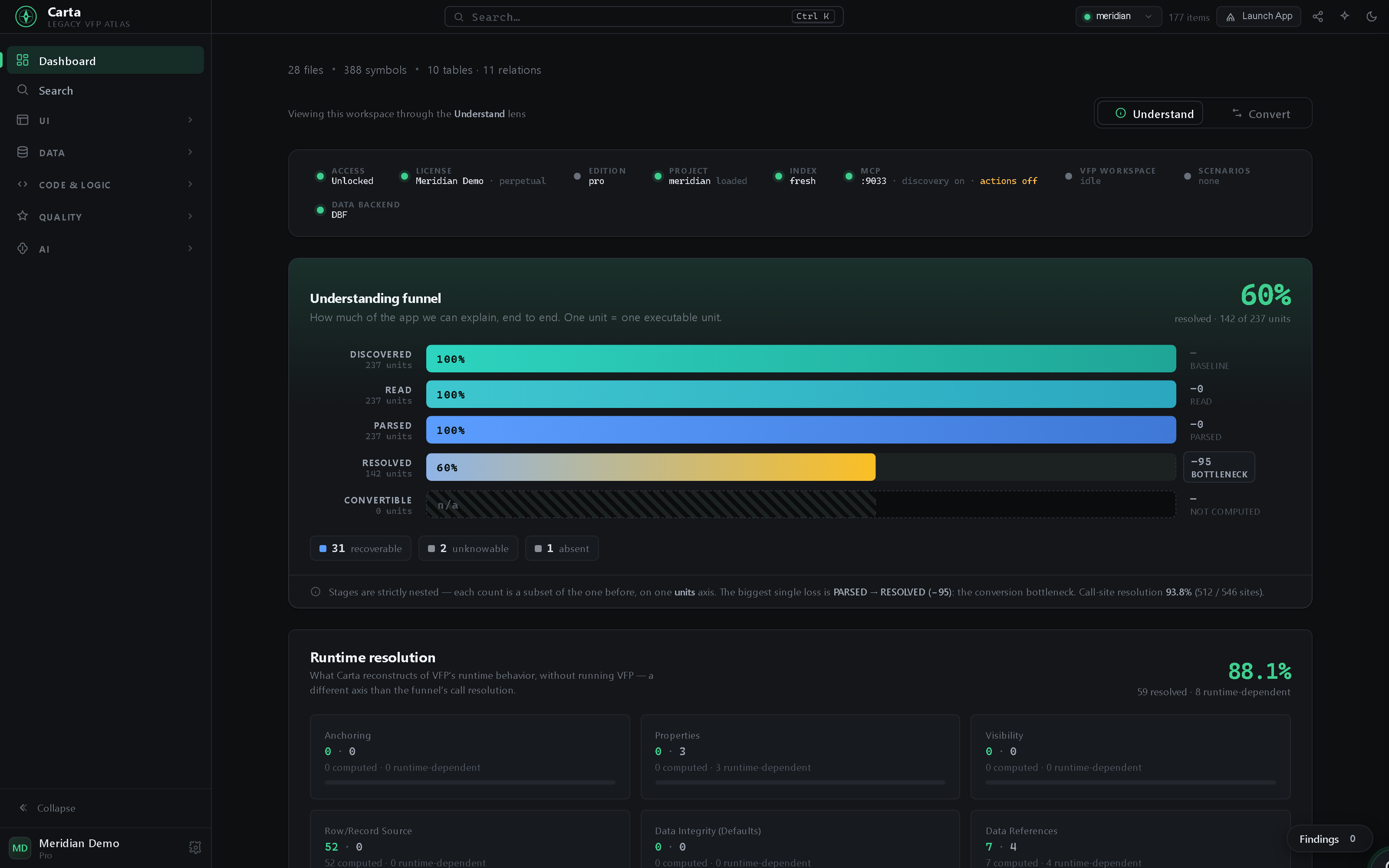
That 60% is static call resolution, not "60% done." Carta reads and parses 100% of the code; 60% of calls pin to a definite target without running anything. The other 40% is VFP's own dynamic dispatch — macros, EVAL, runtime‑decided calls — and Carta doesn't guess at it: it itemizes every one of those sites, what each depends on, and what would prove it — a runtime contract you could hand to a test harness, not a blind spot. No VFP runtime needed to know exactly where the runtime matters.
Open any form, report, or menu straight from the binaries — and walk the app like a user. No VFP.
Every table, the schema and relationships, and a query you run over your own rows.
Complexity hotspots, data-correctness hazards, and where to be careful — whether you're changing the app or moving off it. Plus a convertibility verdict and quick wins.
Search everything (binaries included), trace calls hop by hop, and answer "what breaks?"
Product tour
A quick tour on the fictional Meridian Trading Co. demo project — captured straight from the cockpit, nothing staged. Below it, the whole app in the order you'd actually use it: land on the dashboard, read the screens, follow the data, judge quality, then dig into the code.
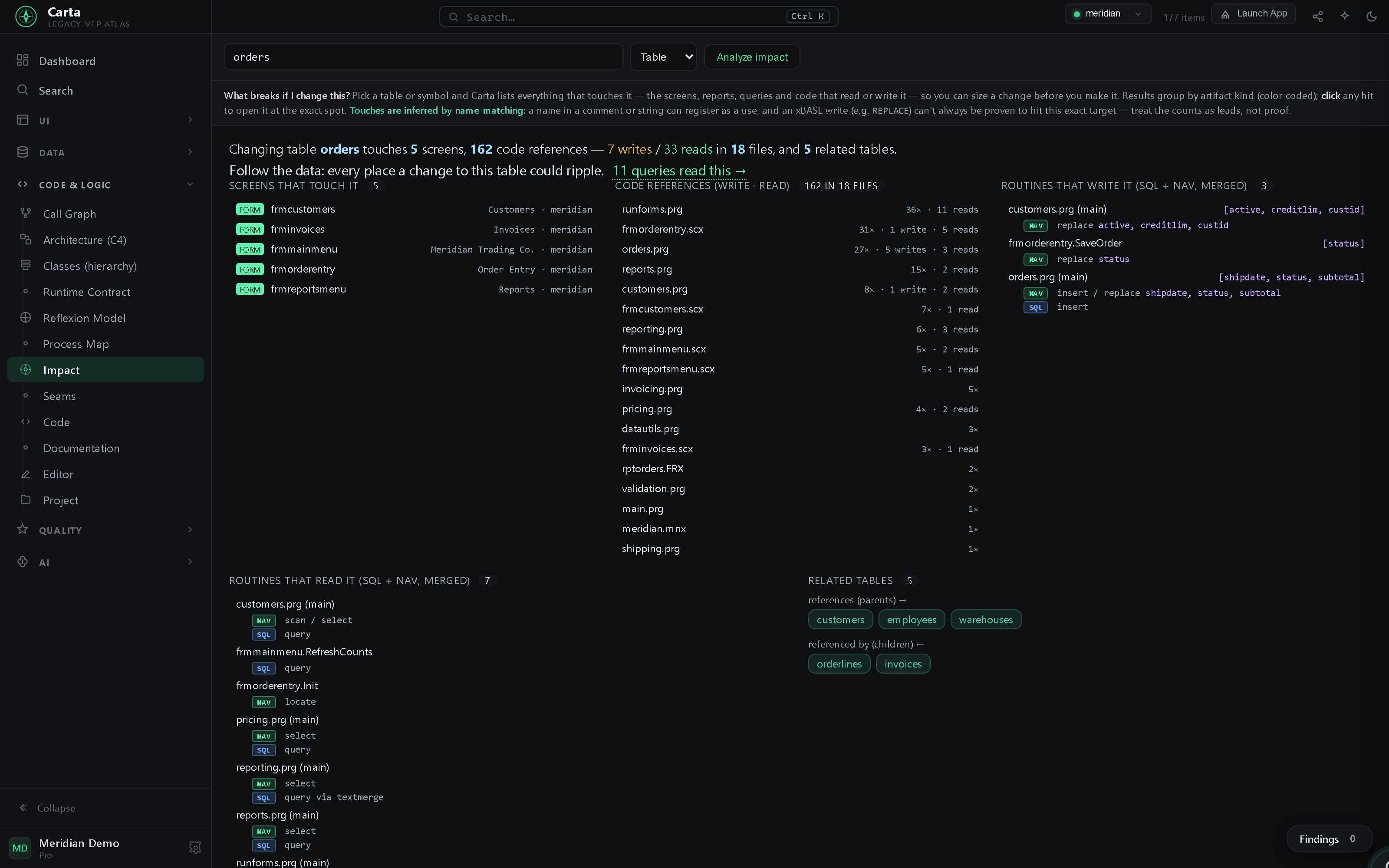
Hover GetNextID: signature, defining file:line, its own doc comment, and a
◂ 6 callers inline count — with an outline and go-to-definition.
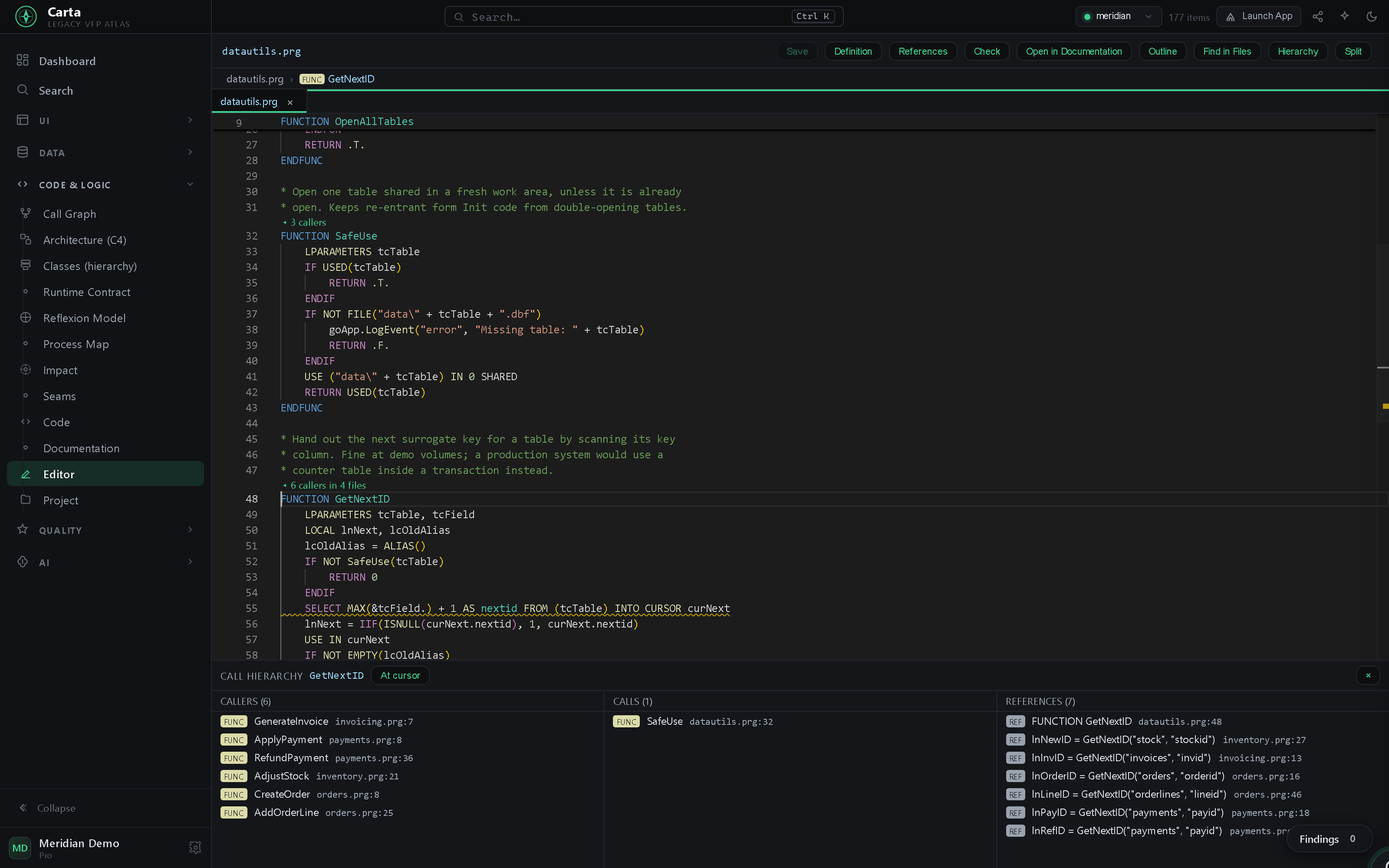
frmOrderEntry (a complex, high-traffic form) → a live data-flow diagram to its
6 tables, with per-method behavior. Click any table to see every screen that touches it.
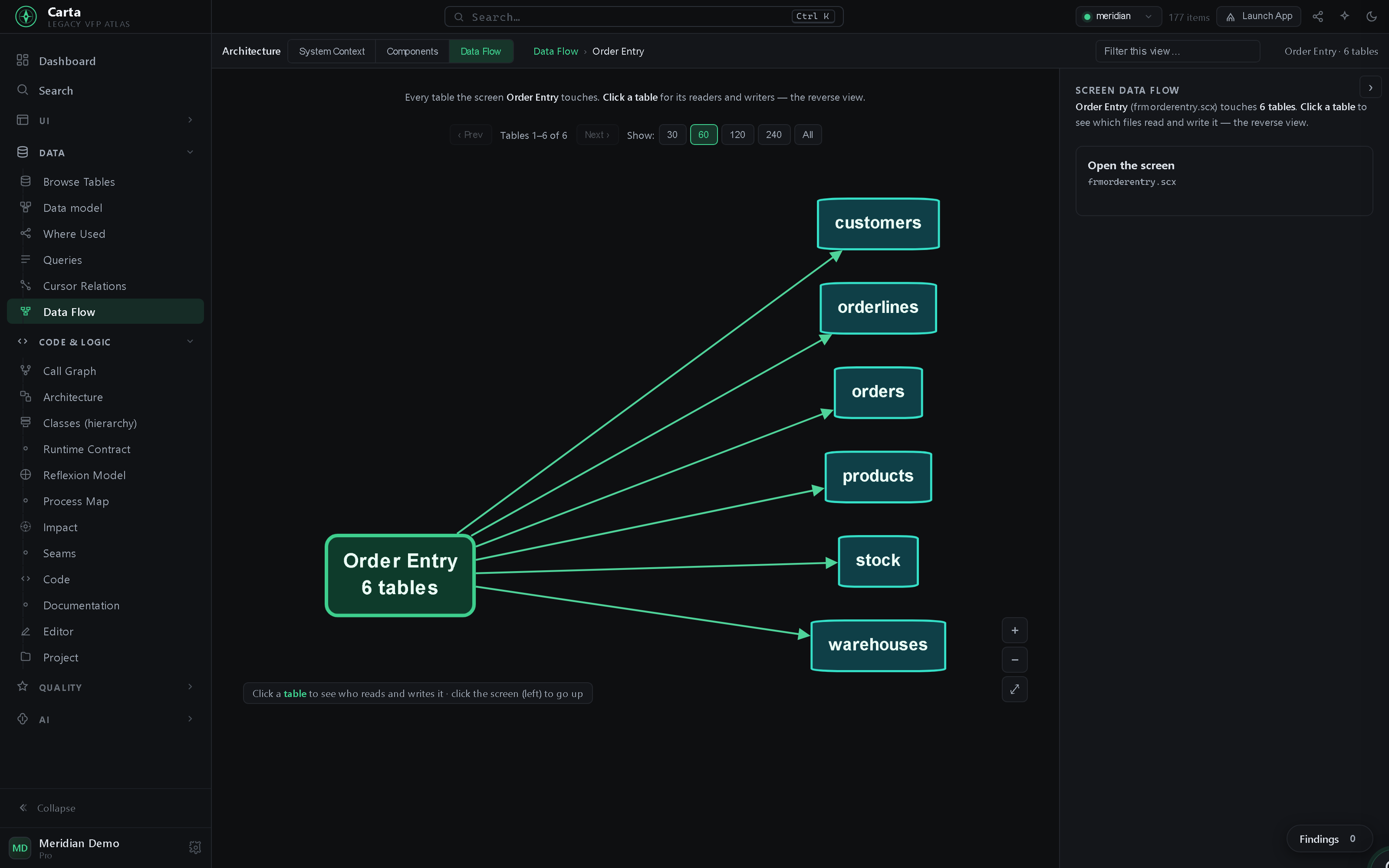
Impact on orders: 5 screens, 162 code references (7 writes / 33 classified
reads) across 18 files, 5 FK-related tables — one query.
Point Carta at a project — even a locked .pjx — and it maps itself. The dashboard briefs you the moment it opens.
The same three-pane Designer — an object tree, a faithful render straight from the binary, and a full property sheet — switches across the app's forms, reports, and menus. One click opens any of them in the real VFP IDE.
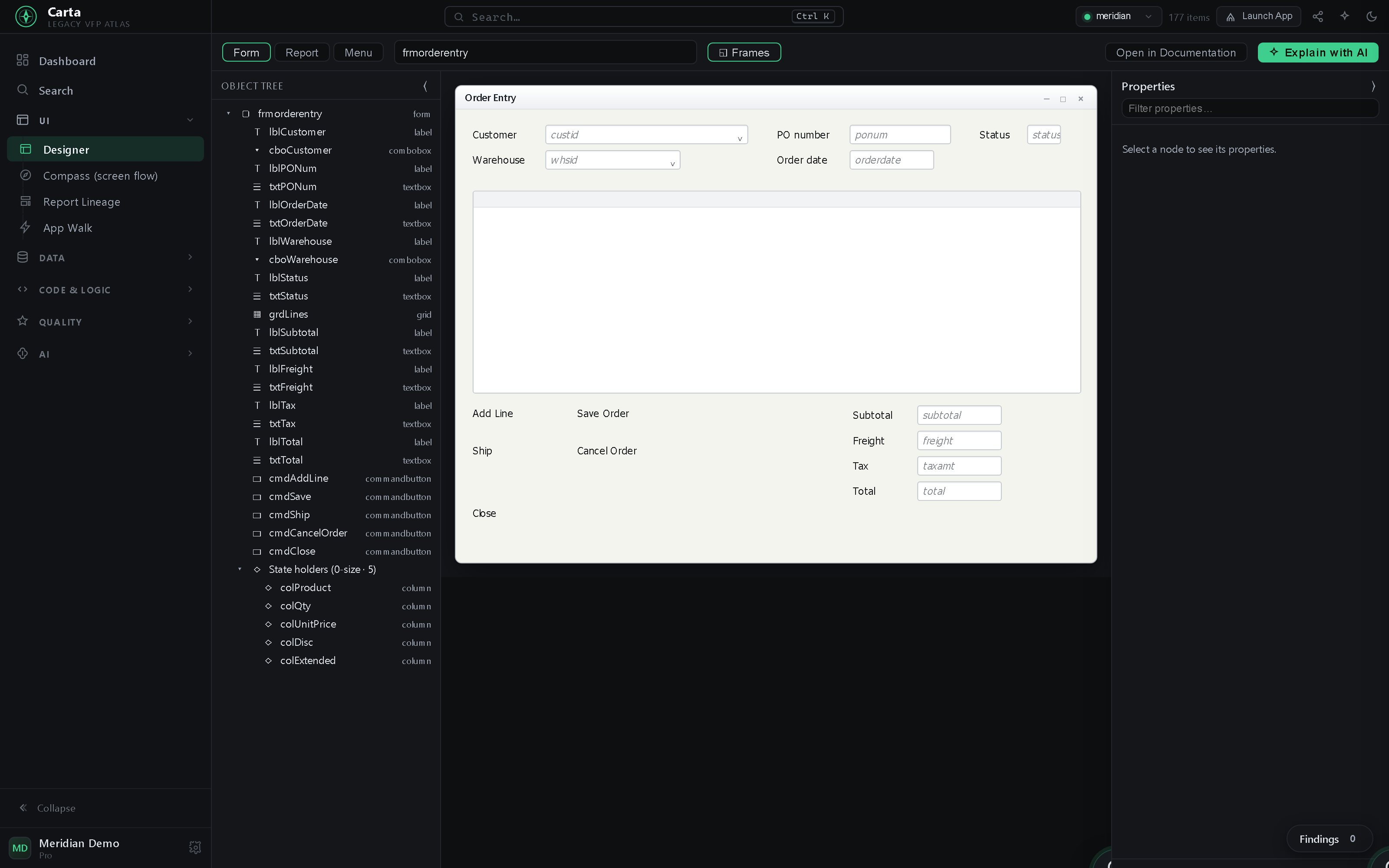
ControlSource, RowSource, geometry and fonts. Carta is a sidecar to VFP — one click opens the same form in the real IDE when you want to edit it.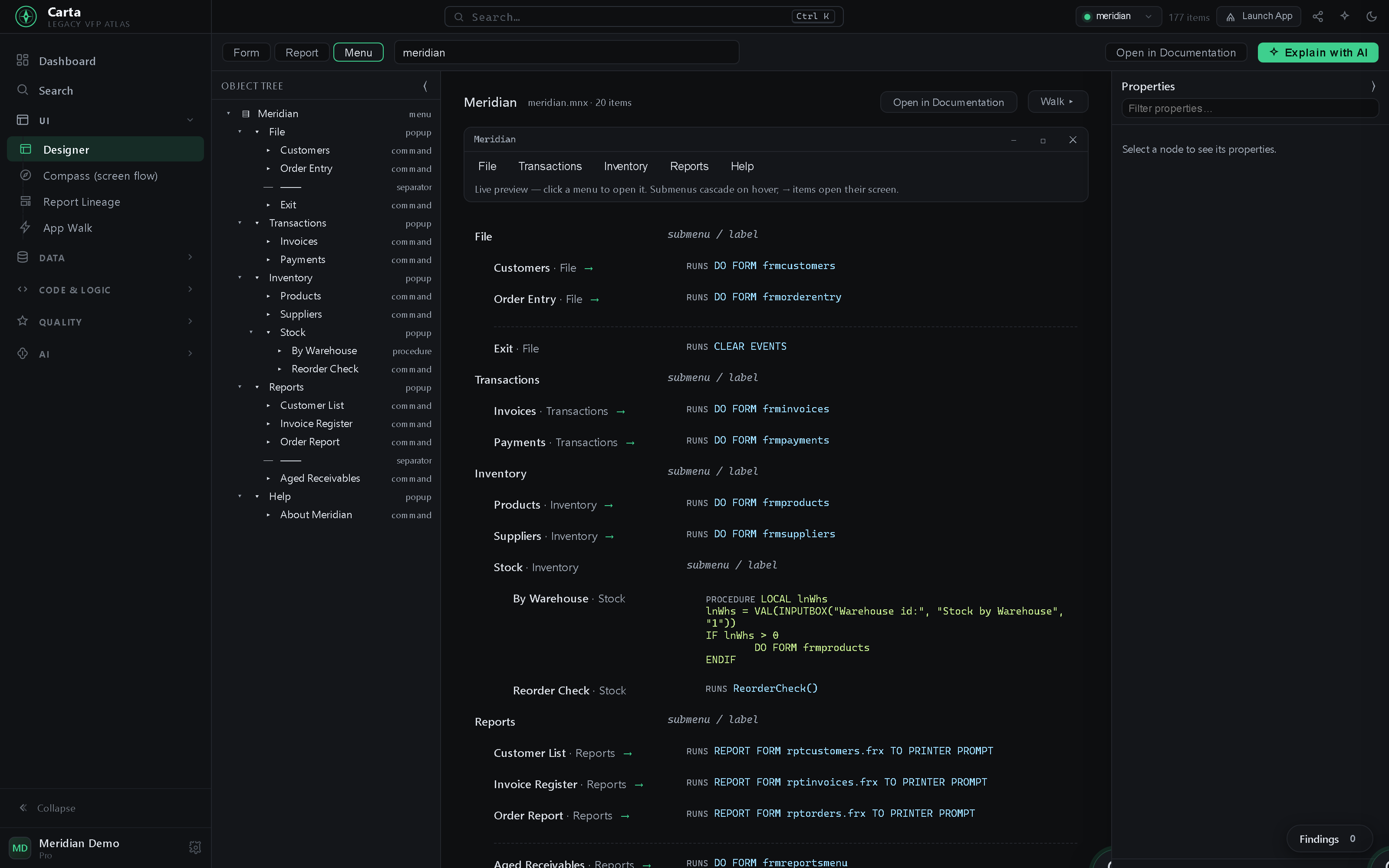
.mnx: a live, clickable menu bar over an item-by-item map of what every choice runs — which screen it opens, which report it prints, the inline code it executes, and when it's disabled.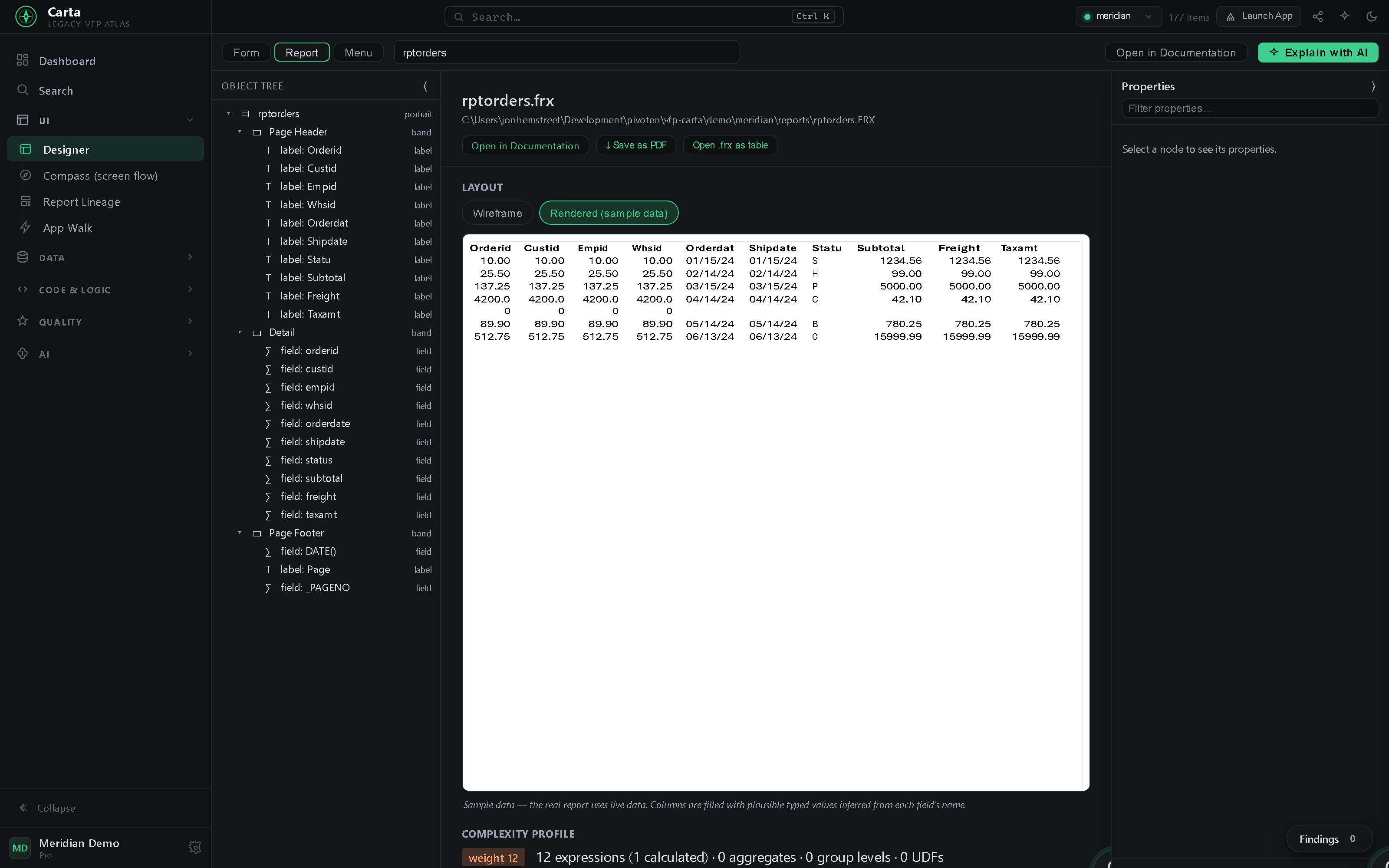
.frx, and its complexity profile, callers, cursor fields and data environment — then one click opens it in the real report designer in VFP.Your app's screens arranged by how users actually reach them — walk it screen to screen like a user would.
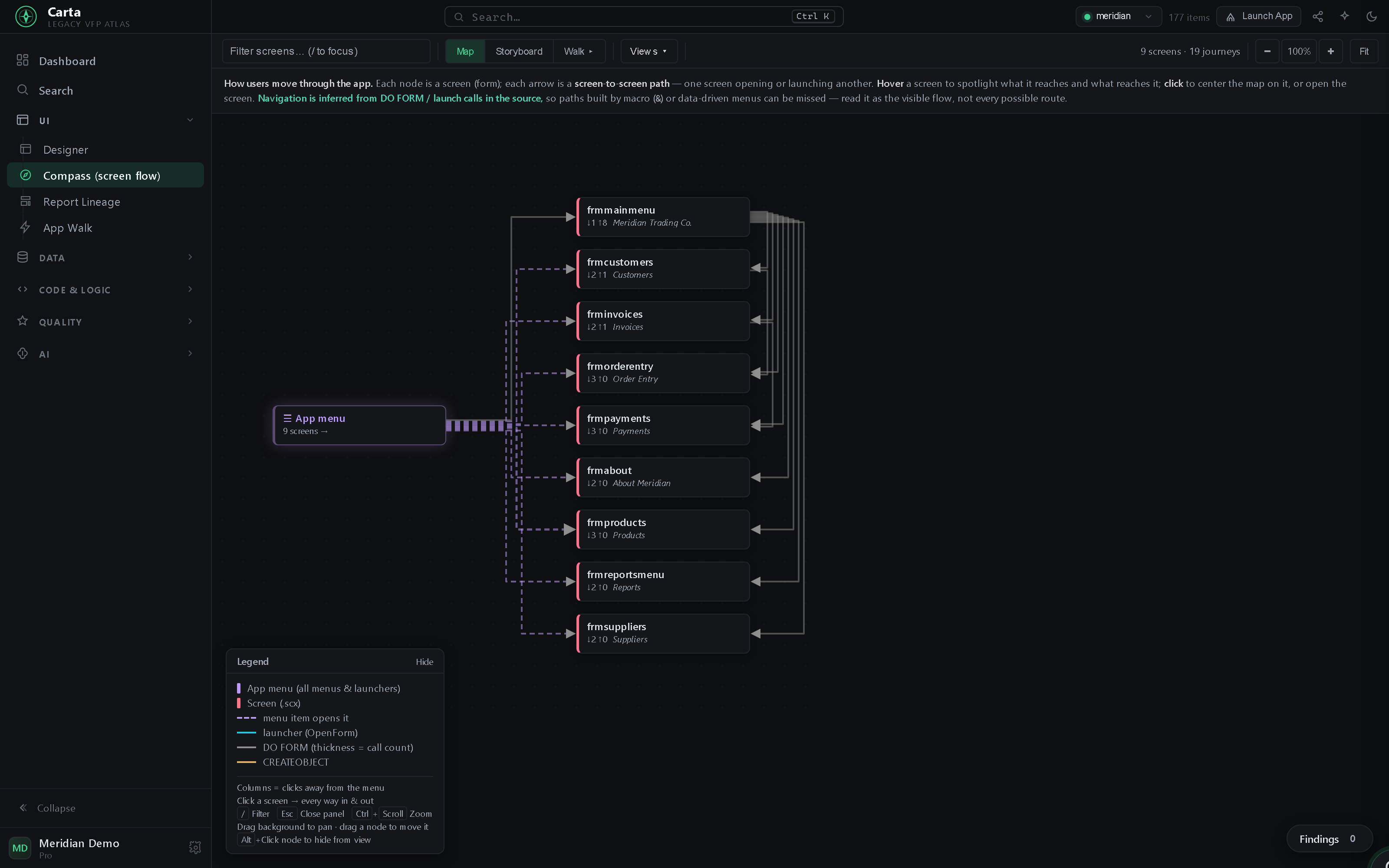
The tables, how they relate, and a query you run straight over your own rows.
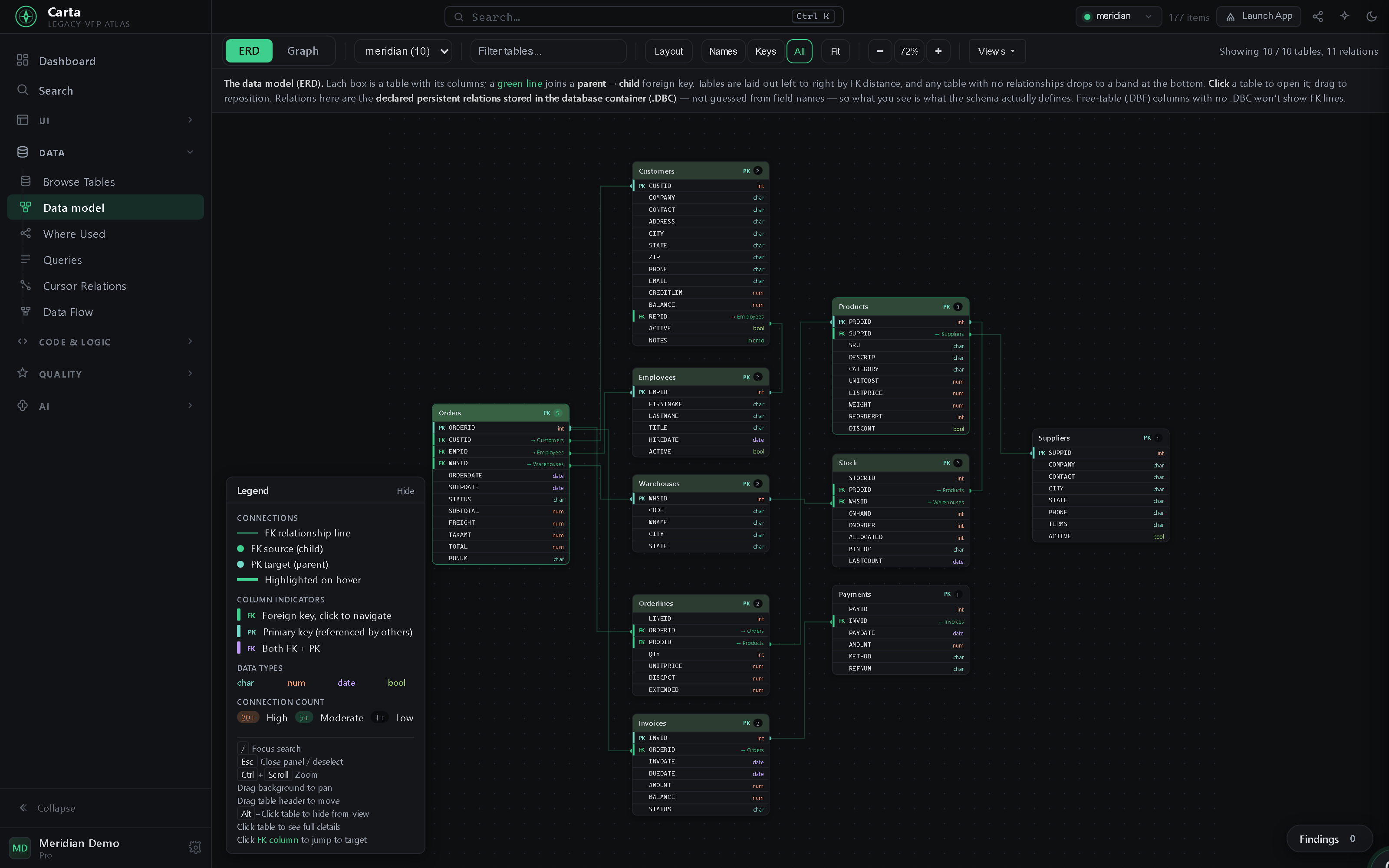
.dbc — the relationships drawn as lines so the whole data model reads at a glance.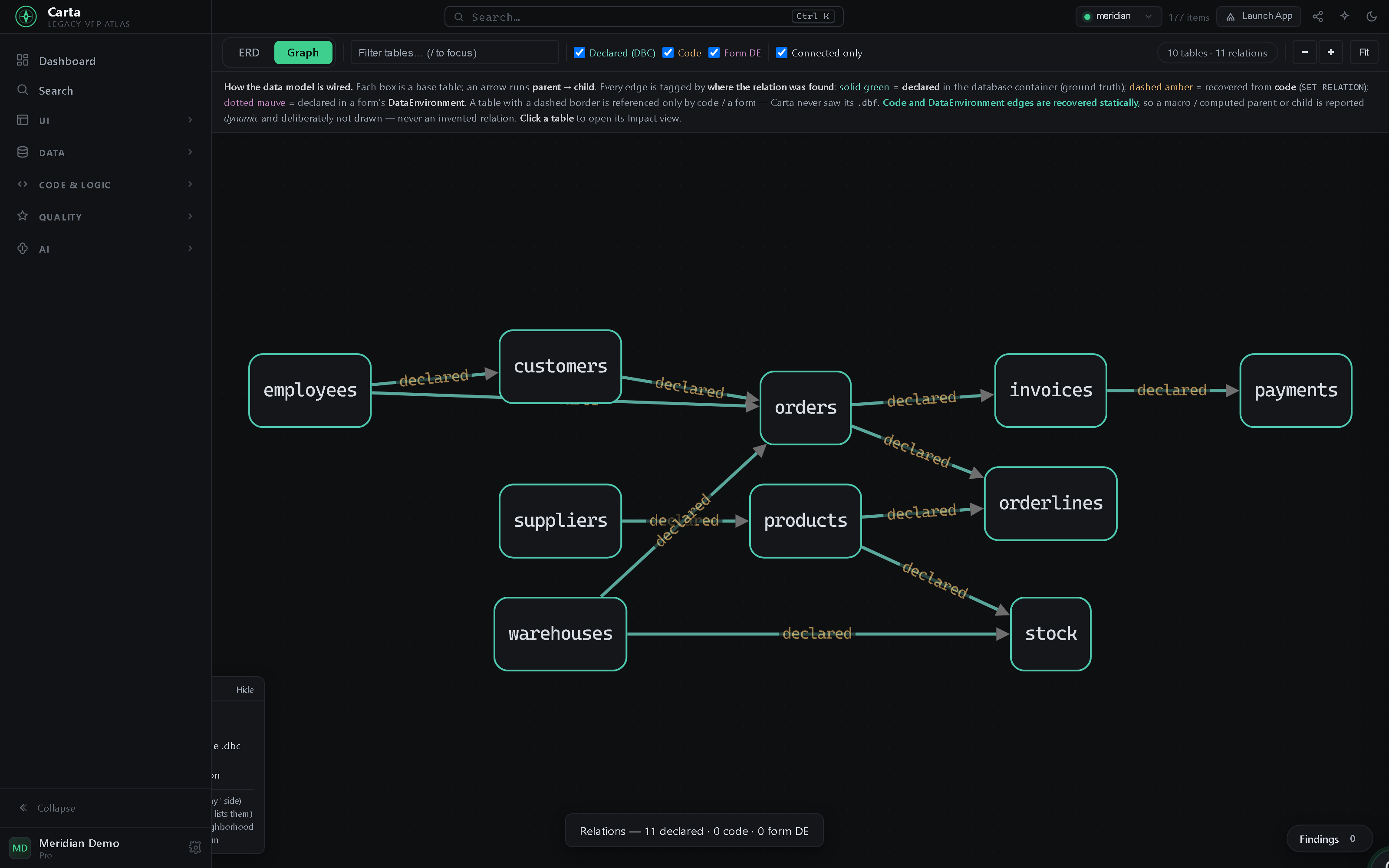
.dbc, plus the ones recovered from code (SET RELATION) and a form's DataEnvironment — every edge tagged by where it was found, and a macro-computed link left out rather than guessed.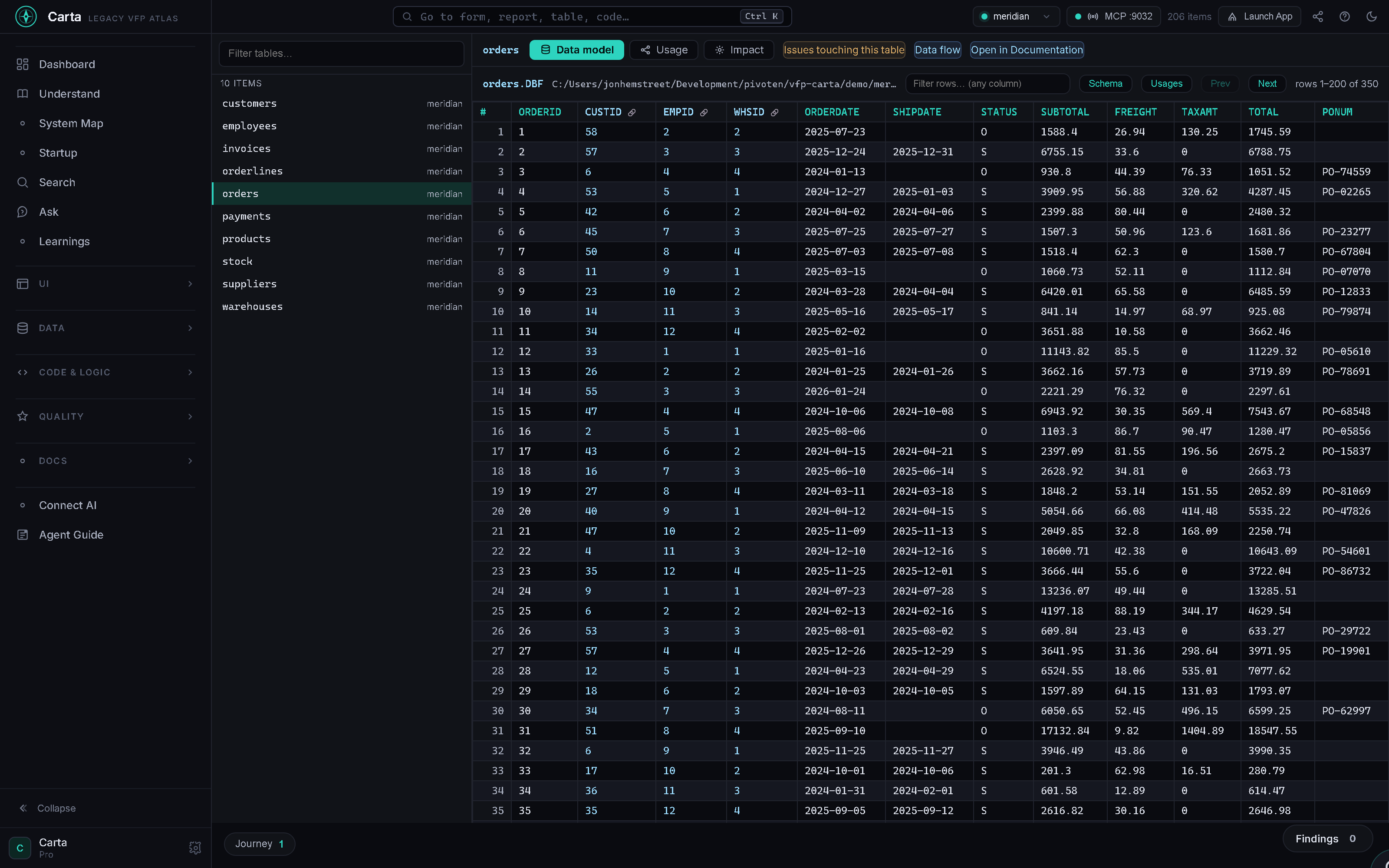
.dbf, with key columns linked so you can follow a record across the database — no FoxPro. Open any table in VFP in one click.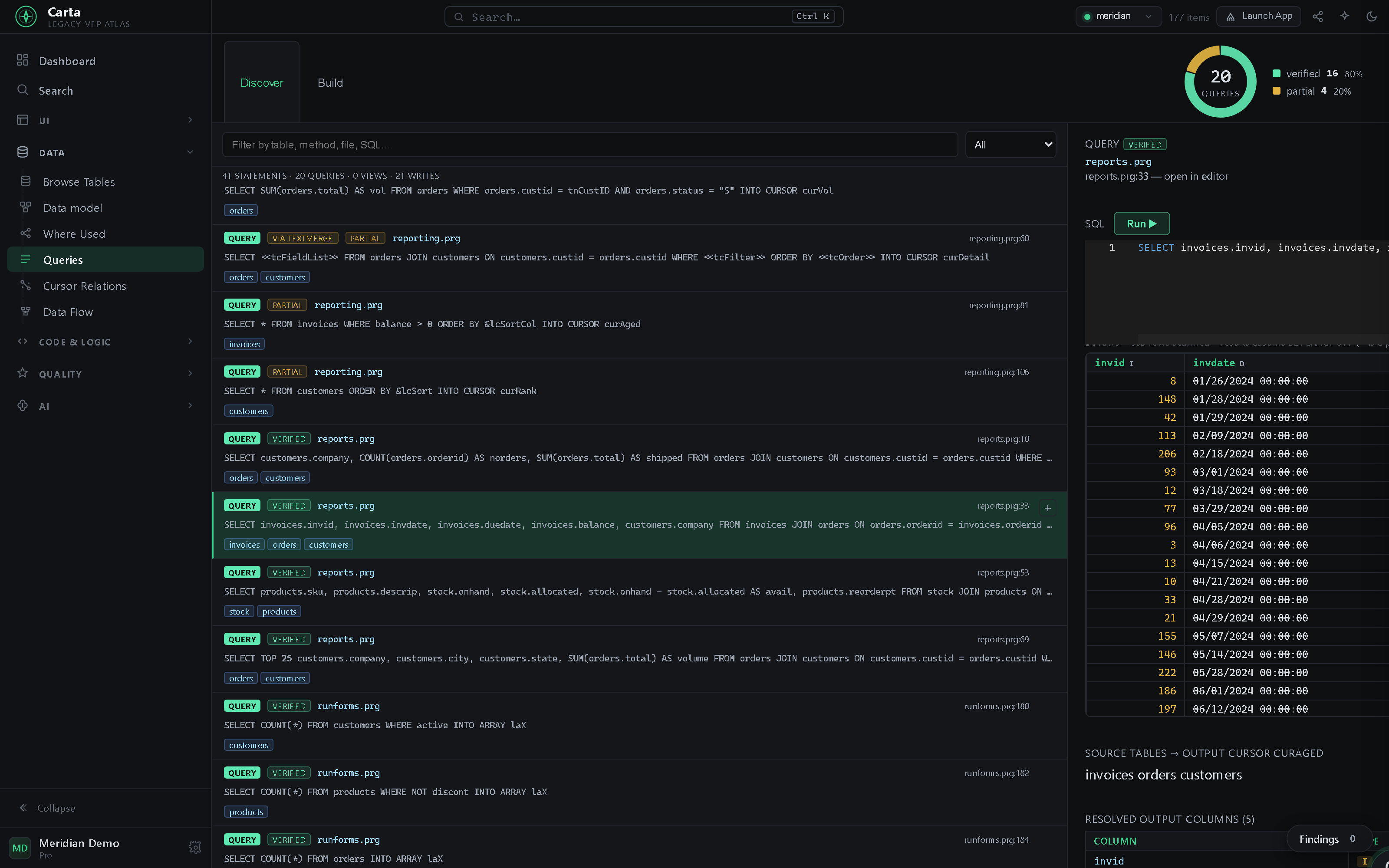
What's risky, what's easy to clean up first, and how portable the whole thing is.
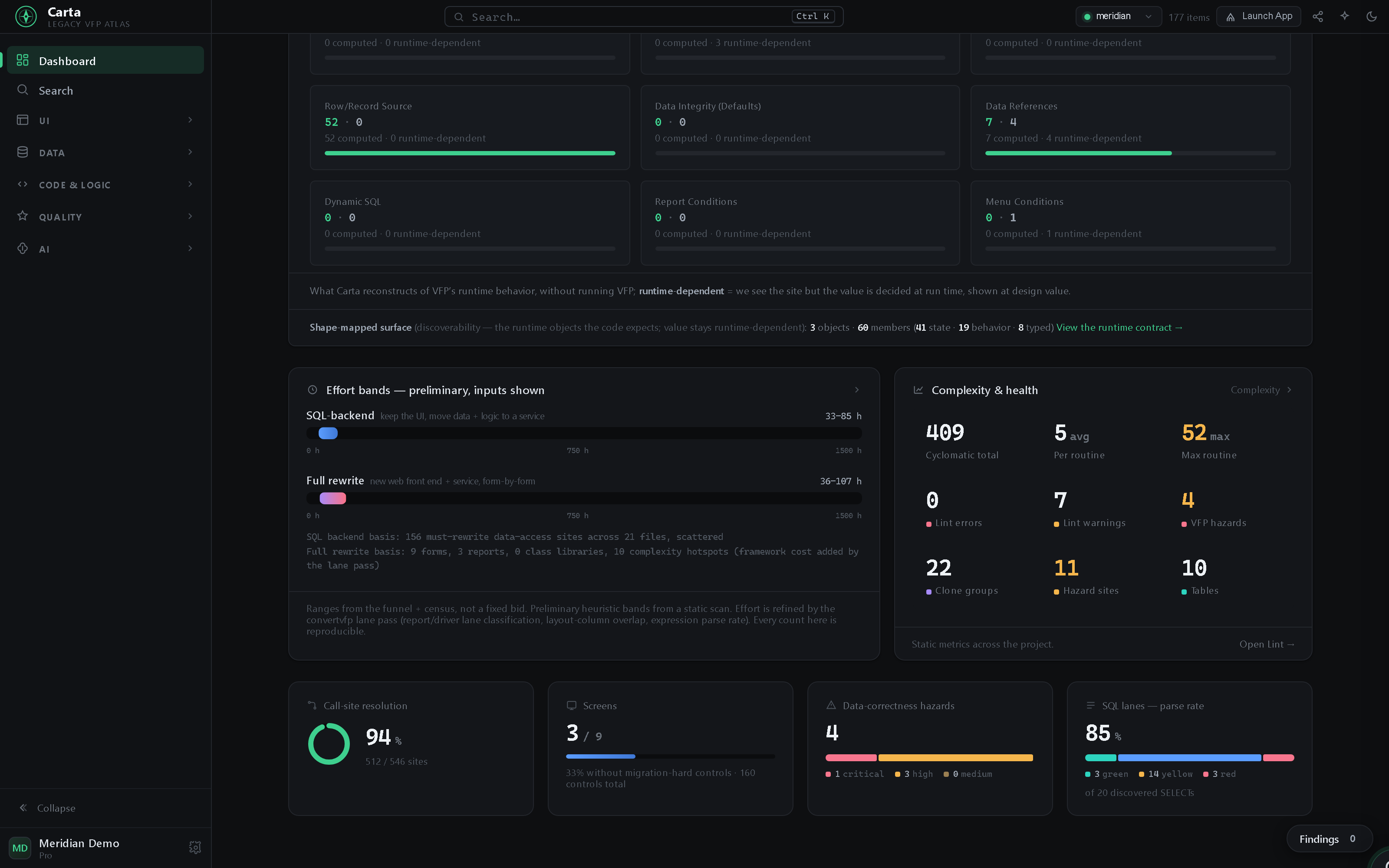
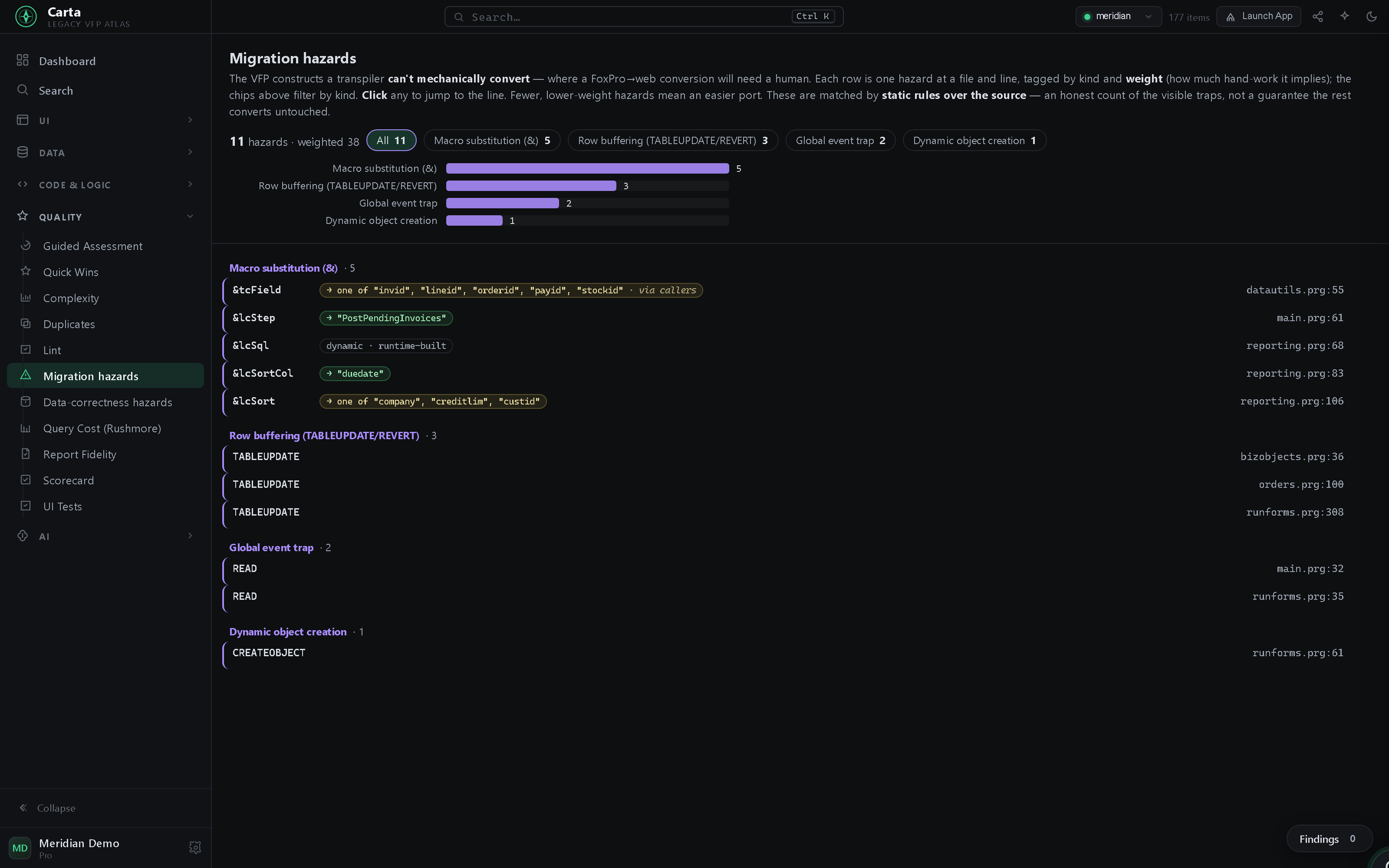
& substitution, row buffering, global event traps), each at a file and line. And Carta doesn't just flag a macro — it resolves what the & expands to where it can prove it: a literal in scope → "duedate", a closed set → one of …, even a parameter read from every call site · via callers — and stays honestly dynamic when it can't.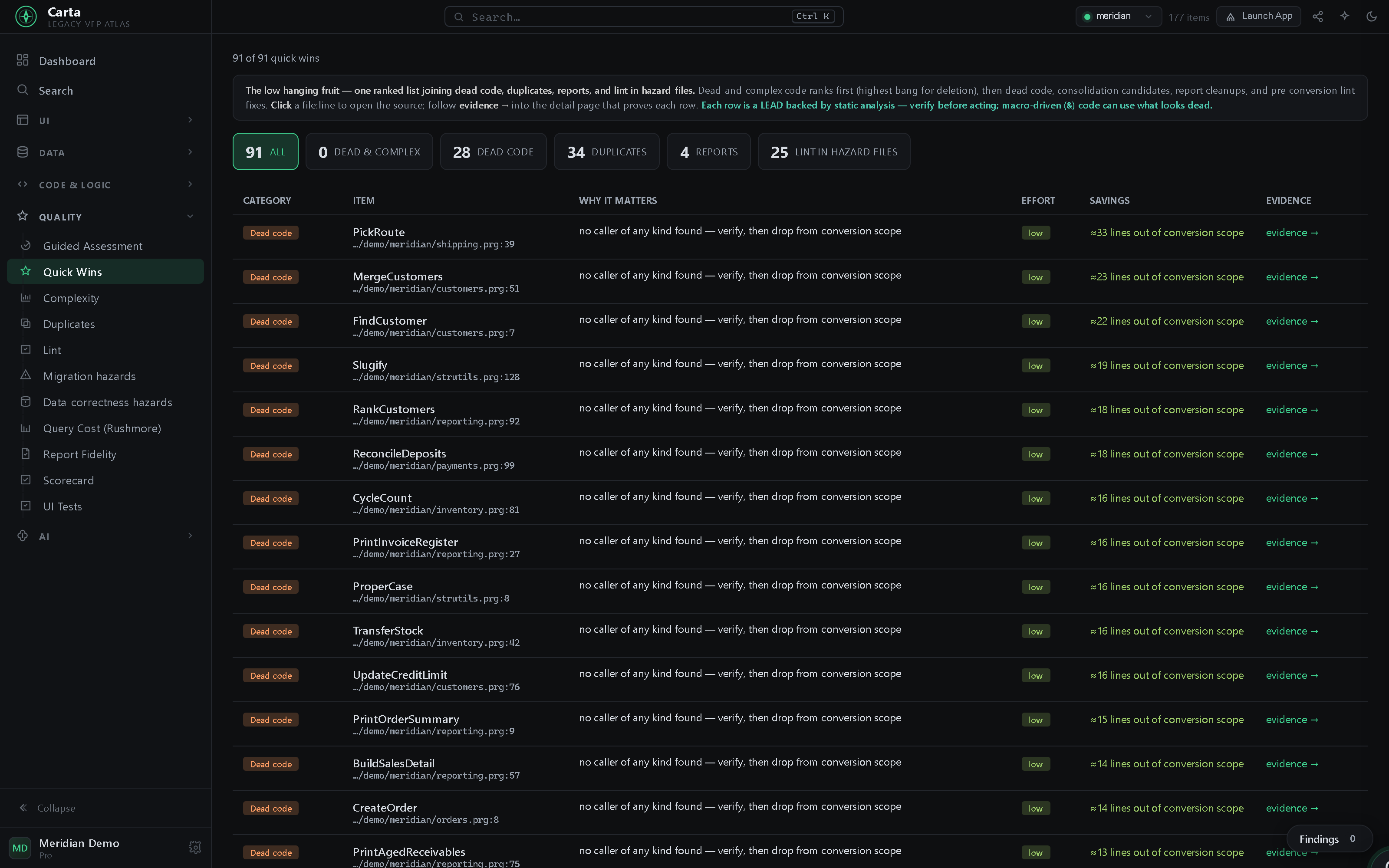
file:line, an effort badge, a measured saving, and an evidence link that proves it — the low-hanging fruit, already picked out.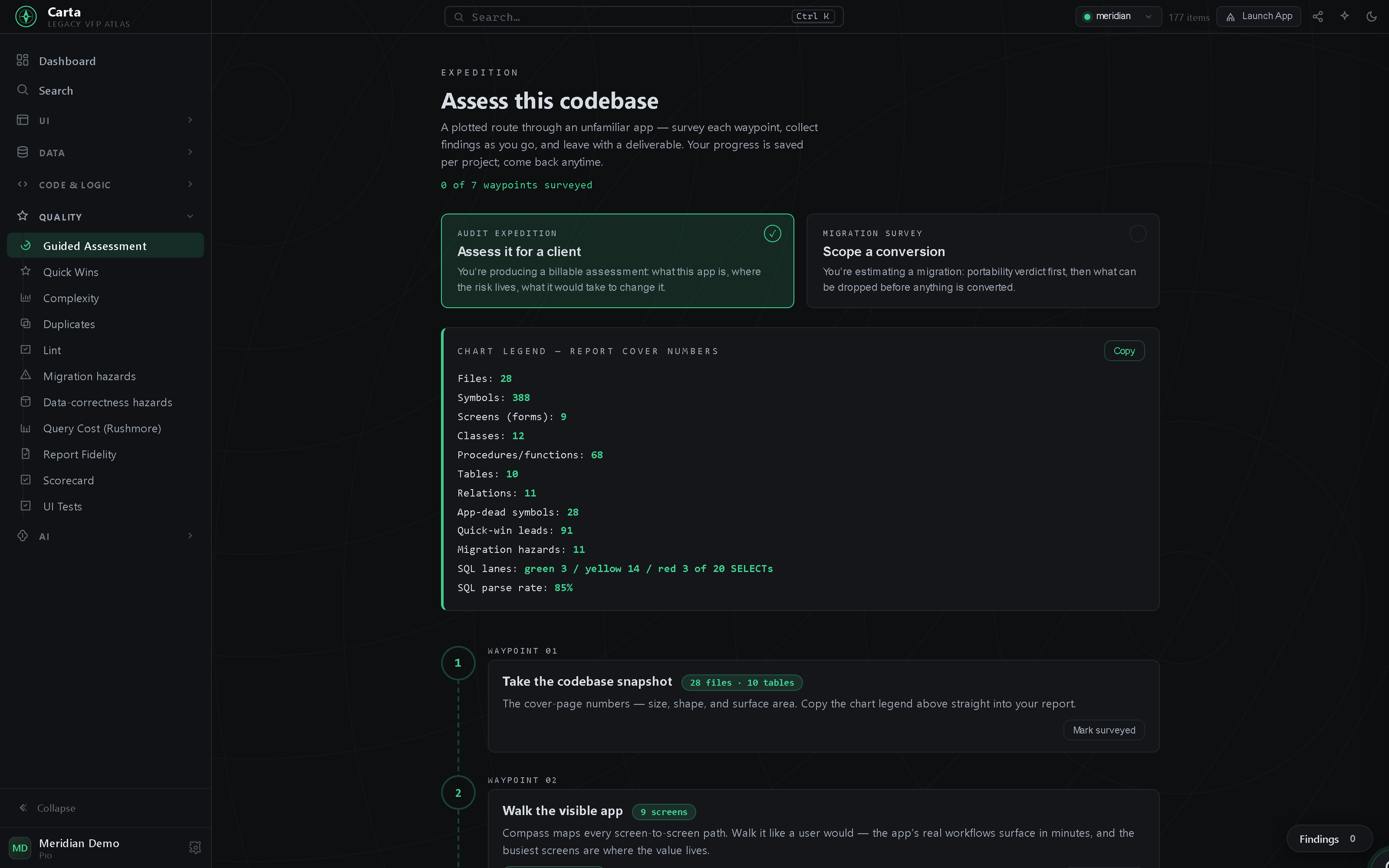
Search everything — including inside the binaries — trace calls hop by hop, and read the class model.
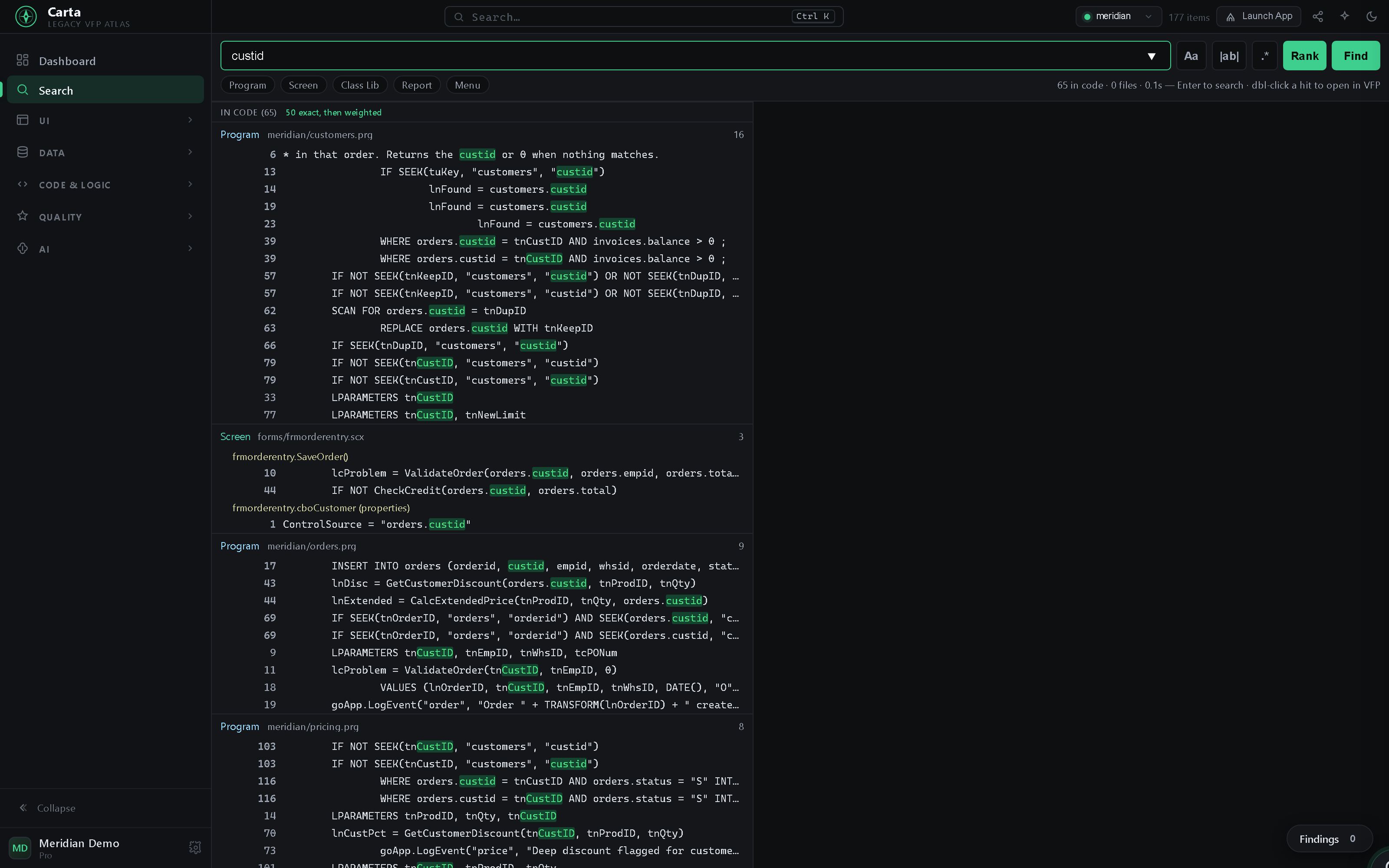
.scx/.vcx/.frx/.mnx too. Ranked so exact identifier matches lead and the looser hits follow. Here custid turns up in a form's method body and a control's ControlSource; double-click any hit to open it in VFP.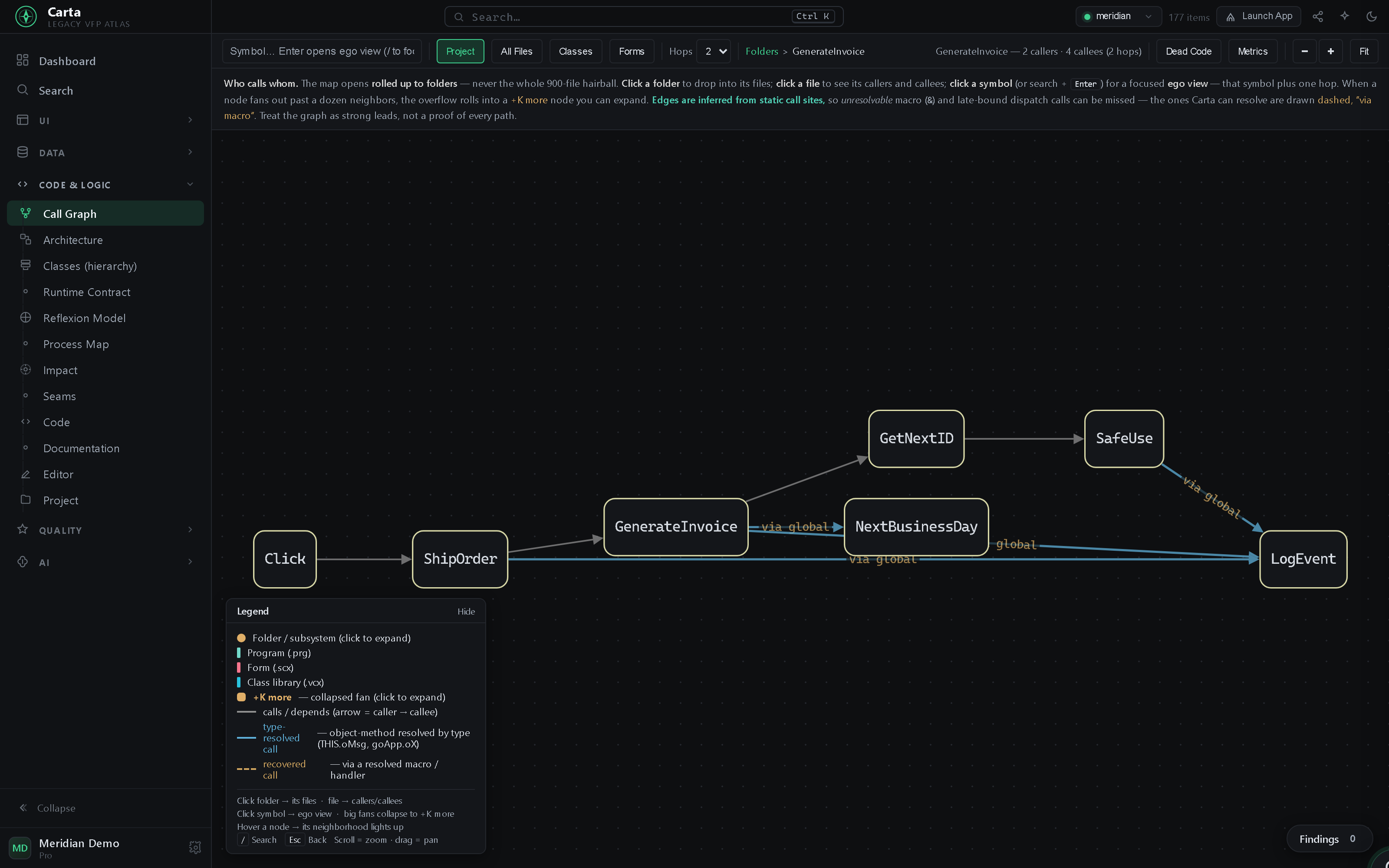
GenerateInvoice with its 2 callers and 4 callees; even macro / late-bound dispatch is recovered and drawn dashed.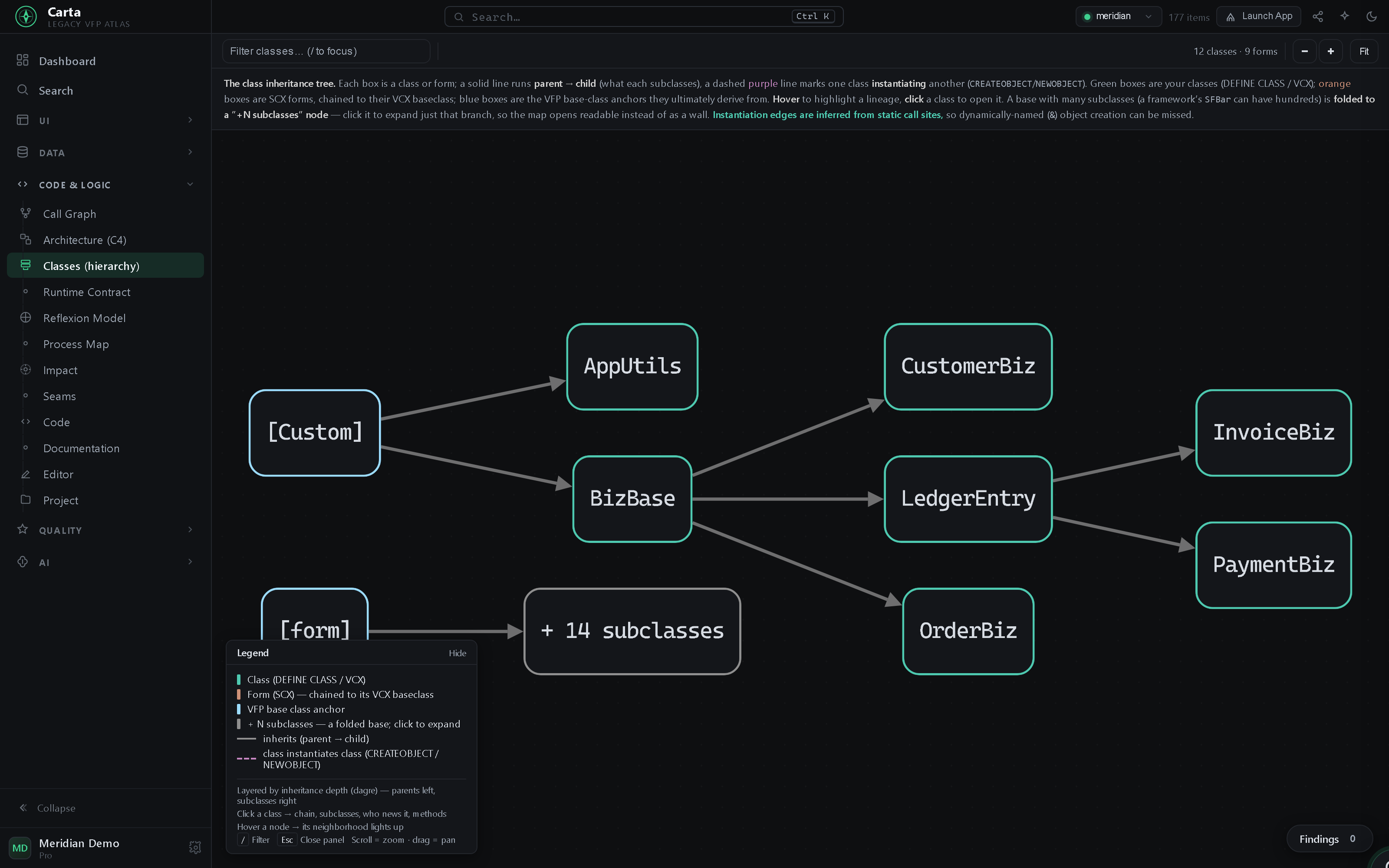
.vcx.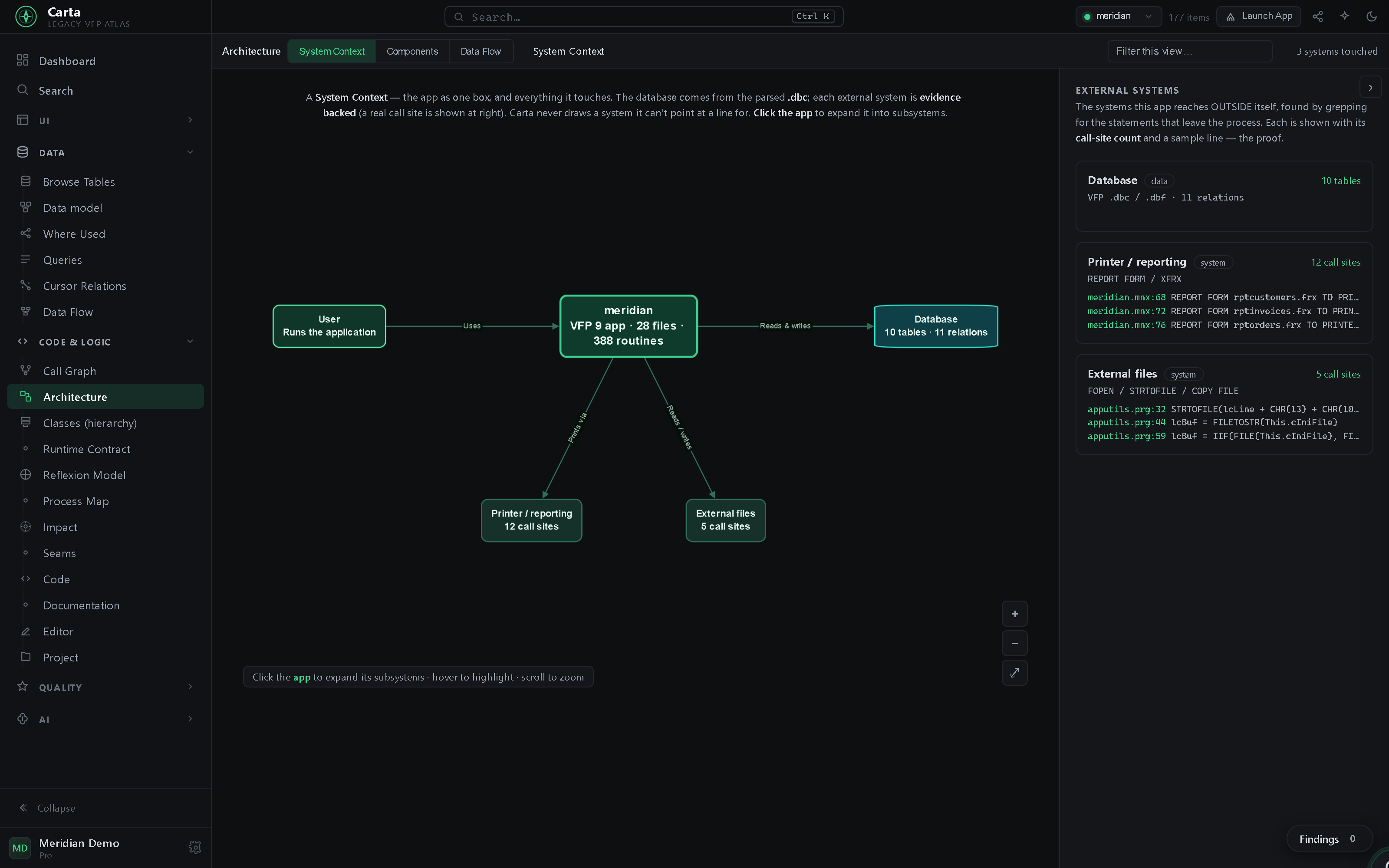
Everything above is one app. A few of the other views it ships with:
Why Carta
VFP has had no modern tooling since 2007 — and half of every FoxPro app is locked inside binary DBF artifacts. Carta was built for exactly that.
"What breaks if I change this?" Table → screens, classified read/write references, FK ripple. Symbol → transitive-caller blast radius. The question every legacy dev asks daily, answered in one query.
Everything Carta knows comes from the project's artifacts alone — the whole
analysis needs no running VFP. It works on any machine, and on projects VFP itself
can't currently open (a locked .pjx included). When you want to edit
or run something, Open in VFP bridges into your own licensed VFP — the one place
anything live happens, and only when you ask.
.scx / .vcx / .frx / .dbc are DBF containers; Carta parses them directly.
That means form previews without opening VFP and method-level search inside
binary forms — not just your .prg files.
No cloud, no agent, no telemetry — and no VFP runtime of its own (the optional bridge drives the VFP you already have). Carta reads your project right on your machine — your source never leaves the building, which is exactly how confidential legacy code should be treated.
Dynamic VFP, head-on.
Macros (&lcField), DO (lcProg), data-driven menus — where static
tools give up. Carta resolves the dynamic calls it can prove (drawn dashed, "via
macro") and flags the rest honestly, so you see the moving parts instead of a blank.
.exe apps, so an AI can drive them, exercise the real business logic, and write your tests.
By the numbers
Every figure below renders in the screenshots above — captured from the Meridian demo project, never customer code.
to map Meridian: 28 files, 10 tables, 9 binary forms, ~2,400 data rows.
first full map of a 2,600-item production app — instant refreshes after that.
for custid — including matches inside binary .scx forms.
impact on orders: 5 screens, 7 writes / 33 classified reads across
18 files, 5 FK-related tables — one query.
frmOrderEntry — grid, combos, bound totals — rendered straight from the
.scx binary. No VFP needed to draw it.
the hottest routine (CalcExtendedPrice) — cyclomatic complexity ranked per
routine, so you know what to change carefully.
Independently verified
Carta reads the binaries directly — so we cross‑check that read against FoxBin2Prg, the FoxPro community's own converter, running in real Visual FoxPro. On the structural facts we diff — class and form parents, members, control classes, field expressions, menu items, database schema — the two agree on every comparable item, on public projects and real apps.
every VFP binary cross‑checked: classes, forms, reports, menus, databases
(.vcx .scx .frx .mnx .dbc).
reads & decodes a whole app's binaries in seconds — no VFP install, so it runs in CI or on a locked project.
reproducible on code you can download — the check runs on open‑source FoxPro projects, not just ours.
We even checked the computed call graph against a real app's actual startup: of the 822 calls it made, 69% were predicted statically — the rest are VFP's own dynamic dispatch no static tool can see — and not one went to a routine Carta didn't know. The product never runs your app; the runtime was only a yardstick.
Carta + your AI
Connect an AI assistant to Carta over the MCP server and chat with your codebase — grounded answers about your own app. Then, if you want, take it a step further: let the server drive the VFP IDE and your standalone VFP apps to navigate, explore, and understand the system in motion — and write your tests for you.
Connect an AI assistant over the MCP server — Claude, or any MCP-capable agent — and ask your app anything: where a symbol lives, what touches a table, how a screen works. Answered from the real project, with the evidence — not a guess.
Take it a step further: the MCP server can drive the real VFP IDE and your standalone VFP apps — navigating, exploring, and exercising the system in motion — so the AI learns the business logic the way a user would and writes down what it finds.
Point the AI at a workflow and it writes the unit and end-to-end tests for you, grounded in what it just exercised in the live app — regression coverage for a 30-year codebase that never had any.
You decide what the AI may touch — read-only by default, actions opt-in. It all runs locally against the VFP you already have, and your source and data never leave the building.
Assessment
You can't plan what you can't see. Carta turns a 30-year black box into a scoped, shareable assessment — what's there, what's hard, and where to start — whether you're auditing the app to maintain it or scoping a move off FoxPro. It comes from a static read, so you get a confident plan before anything changes.
file:line. It does not auto-convert your code. You leave with a shareable assessment — SQL lanes, effort bands, hazards, quick wins, exportable to Markdown — to plan the move with your own team, on your timeline. Understanding is the deliverable; the rewrite stays yours (with your AI, if you like).
A portability verdict over the whole app: size, complexity, health, and the SQL "lanes" — how much of your queries translate cleanly (green), need work (yellow), or fight you (red) — with effort bands you can put in a plan.
One triage list that joins dead code, duplicates, unused & missing reports, and
lint in hazard files — each with a file:line, an effort badge, and a
measured saving. The low-hanging fruit, already picked out.
A step-by-step expedition through the app that collects findings as you go — with your own notes — then exports to Markdown you can drop into a proposal or a stakeholder review. The map outlives the one dev who knew the system.
Migration hazards generic tools never see: macro-expansion &, runtime
EVAL, SCATTER/GATHER, buffering and SET-state
traps — and reports that saved a printer environment, the classic deployment
landmine. Each located, effort-weighted, and honest about what it can't prove.
Get Carta
It's early days. Email us and we'll set up a demo.
The full map, plus the bridge into a real, licensed VFP 9 IDE on your machine.
.scxFAQ
Yes — that's the primary use case. Carta gets a developer productive in an unfamiliar VFP app fast: search everything (binaries included), go-to-definition, the call graph, the ERD, form/report/menu previews, and "what breaks if I change this?" impact analysis. No migration required — just faster, safer day-to-day work on the app you already run.
No. Carta uses offline, signed license keys — a self-contained statement of who bought what. There's no activation server and no phone-home. Your key covers every build released while it's current; when it lapses, those builds keep working forever — only newer builds ask you to renew.
Never. Carta runs entirely on your machine — no cloud, no telemetry, nothing to sign in to. It reads and analyzes by default; anything that changes your project — an edit you save, or an action you let an AI take — is explicit, local, and backed up.
That's exactly when you need the map most — and Carta is built for it. Scoping a move means knowing what's actually there: the ERD, the dead code, the dependency tangles, the complexity hotspots. Carta adds a convertibility scorecard (with SQL "lanes" and effort bands), a quick-wins triage, and a guided assessment you can export to Markdown for a proposal or stakeholder review. It turns "we can't estimate what we can't see" into hours of work — and the map outlives the one developer who knew the system. Note: Carta scopes and assesses the move — it doesn't auto-convert your app. It makes the move estimable and hands you the map; the rewrite is yours (with your AI, if you like).
A signed, self-updating standalone app you double-click — no install, no editor required. Add the optional MCP server to let an AI assistant drive the VFP IDE and a live VFP app alongside it.
Windows x64 and Windows arm64, as a signed standalone app. The optional MCP server drives a real VFP 9 IDE and a standalone VFP app — both Windows — so that's where Carta ships.
No — Carta meets VFP developers where they live. Every view has Open in VFP: forms open in the Form Designer, classes in the Class Browser, tables in a Browse window. The real IDE stays for what it's uniquely good at; Carta adds everything it never had.